
Vultr pricing on vultr.com/pricing (checked October 28, 2026): Cloud Compute starts at $2.50/month for an IPv6-only plan, $3.50 with IPv4 and $5 for the first practical 1 GB plan; NVMe plans start at $6 and dedicated-CPU VX1 at $43.80. Automatic backups add 20%, snapshots cost $0.05/GB a month, DDoS protection $10/month, and stopped servers bill until destroyed.
This post contains affiliate links. If you purchase through our links, we may earn a commission at no extra cost to you.
Vultr pricing 2026: all plan tiers at a glance
As of October 28, 2026, Vultr’s pricing page lists these compute product families:
- Cloud Compute Regular Performance (VC2 / Standard): shared vCPU, previous-generation Intel, regular SSD, entry-level pricing
- Cloud Compute High Performance (AMD EPYC / NVMe): newer AMD EPYC or Intel Xeon processors (same prices for both), NVMe storage
- Cloud Compute High Frequency (Intel Xeon): Intel Xeon at 3GHz+, NVMe SSD, 10 sizes from $6 to $320
- VX1: dedicated AMD EPYC cores, launched October 2025, Vultr’s newest tier
- Optimized Cloud Compute: dedicated resources, with General Purpose, CPU Optimized and Memory Optimized sub-tiers
- Bare Metal: physical dedicated servers, no virtualization
- Cloud GPU: on-demand NVIDIA and AMD GPU instances
Billing is hourly with a monthly cap: 672 hours for most compute instances and 730-hour months for GPU servers, while VX1 is billed for the actual hours in each calendar month (Vultr FAQ). A server you spin up at noon and destroy by midnight bills 12 hours, not a month.
Prices last verified: October 28, 2026 (vultr.com/pricing)
Cloud Compute pricing: Standard, High Performance, and High Frequency
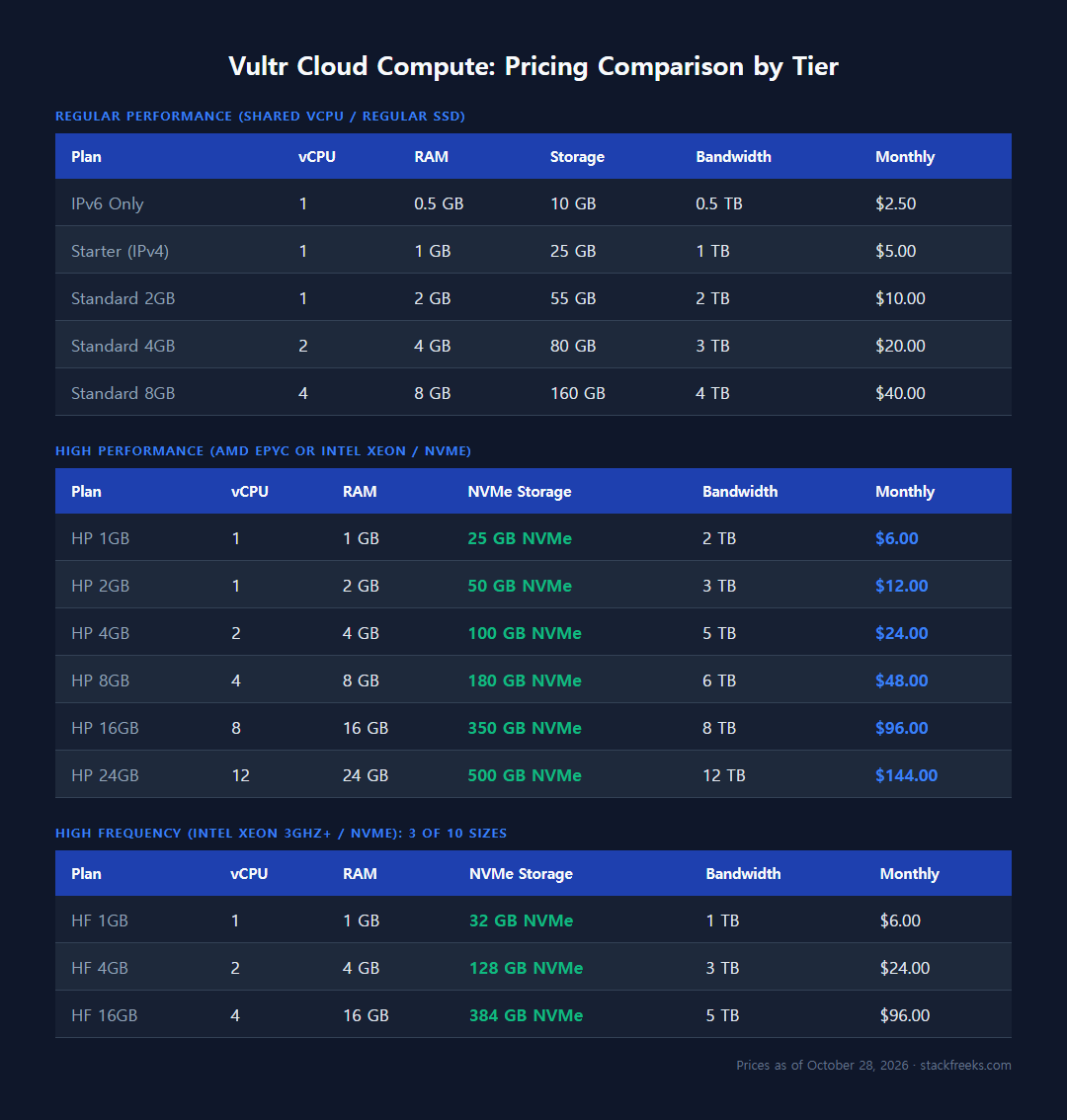
Standard Cloud Compute (shared vCPU / regular SSD)
This is Vultr’s true entry tier, called Regular Performance on the pricing page: shared vCPUs, previous-generation Intel CPUs, regular SSD storage, and the lowest prices in the lineup.
| Plan | vCPU | RAM | Storage | Bandwidth | Monthly |
|---|---|---|---|---|---|
| IPv6 Only | 1 | 0.5 GB | 10 GB | 0.5 TB | $2.50 |
| Starter (IPv4) | 1 | 1 GB | 25 GB | 1 TB | $5.00 |
| Standard 2GB | 1 | 2 GB | 55 GB | 2 TB | $10.00 |
| Standard 4GB | 2 | 4 GB | 80 GB | 3 TB | $20.00 |
| Standard 8GB | 4 | 8 GB | 160 GB | 4 TB | $40.00 |
The $2.50 plan works only over IPv6 (no IPv4 address included), and it is offered in very few locations (two in Vultr’s plan list, with a $3.50 IPv4 version in one). For anything with a domain attached or a web-facing app, you’re realistically starting at $5/month. The Standard 2GB plan at $10/month is solid for a basic WordPress site, personal project, or staging server, but in our Tokyo test the $5 plan’s regular SSD wrote at 308 MiB/s against 1017 to 1816 MiB/s on the $6 NVMe plans.
High Performance Cloud Compute (AMD EPYC / NVMe)
High Performance plans run on AMD EPYC or Intel Xeon CPUs with NVMe SSD, and Vultr charges the same for both, so pick the AMD variant: our 1 GB AMD instance in Tokyo reported EPYC-Rome, while the $5 Regular box reported Intel Broadwell.
| Plan | vCPU | RAM | NVMe Storage | Bandwidth | Monthly |
|---|---|---|---|---|---|
| HP 1GB | 1 | 1 GB | 25 GB | 2 TB | $6.00 |
| HP 2GB | 1 | 2 GB | 50 GB | 3 TB | $12.00 |
| HP 4GB | 2 | 4 GB | 100 GB | 5 TB | $24.00 |
| HP 8GB | 4 | 8 GB | 180 GB | 6 TB | $48.00 |
| HP 16GB | 8 | 16 GB | 350 GB | 8 TB | $96.00 |
| HP 24GB | 12 | 24 GB | 500 GB | 12 TB | $144.00 |
High Frequency Cloud Compute (Intel Xeon 3GHz+)
Intel Xeon at 3GHz+ with NVMe SSD, in 10 sizes from $6 to $320 a month (the table shows three). At $6 it has more disk than High Performance (32 GB vs 25 GB), but for raw CPU speed at $6 the AMD plan was far ahead in our test (see below).
| Plan | vCPU | RAM | NVMe Storage | Bandwidth | Monthly |
|---|---|---|---|---|---|
| HF 1GB | 1 | 1 GB | 32 GB | 1 TB | $6.00 |
| HF 4GB | 2 | 4 GB | 128 GB | 3 TB | $24.00 |
| HF 16GB | 4 | 16 GB | 384 GB | 5 TB | $96.00 |
Price per performance: the $6 AMD plan gave the most per dollar in our test
A pricing table tells you what each plan costs, not what the dollar buys. To put a number on that for the three entry plans above, we benchmarked the $5 Regular, $6 High Frequency and $6 High Performance AMD plans in Tokyo on 2026-09-25 (Ubuntu 24.04, one run each): sysbench cpu --threads=1 --time=30, a 30-second fio 4k random read at queue depth 32, and a 30-second fio 1M sequential write. Then we divided each result by the monthly price.
| Plan (Tokyo) | Monthly | sysbench events/s (per $1) | 4k random-read IOPS (per $1) | 1M seq write, MiB/s (per $1) |
|---|---|---|---|---|
| Regular (Intel Broadwell) | $5.00 | 817.61 (163.5) | 59.7k (~11.9k) | 308 (61.6) |
| High Frequency (Intel Skylake) | $6.00 | 1170.04 (195.0) | 110k (~18.3k) | 1017 (169.5) |
| High Performance AMD (EPYC-Rome) | $6.00 | 4303.83 (717.3) | 107k (~17.8k) | 1816 (302.7) |
Our test, 2026-09-25, Vultr Tokyo. CPU names are what lscpu reported on each instance. Per-dollar figures are the raw result divided by the monthly price.
The cheapest plan was the worst value on every metric. Regular’s $5 bought 163.5 sysbench events/s per dollar; the $6 AMD plan bought 717.3, so one extra dollar a month got about 5.3x the single-thread score (4303.83 vs 817.61) and roughly 5.9x the sequential write speed (1816 vs 308 MiB/s). That backs the “skip the $5 plan” advice later in this guide with numbers rather than spec-sheet reasoning.
Between the two $6 plans, the choice is lopsided on CPU and close on random reads: AMD did 3.68x High Frequency’s CPU score and 1.79x its sequential write, while random-read IOPS were 107k vs 110k, too close to call from one run. At identical prices, High Frequency’s remaining edge is its larger disk, since High Performance also comes in an Intel Xeon variant at the same price. One caveat: sysbench’s prime-number test rewards newer CPU generations heavily, so treat the 5.3x as “much faster on CPU-bound work”, not as a 5.3x faster website. The full run, with raw output, is in our Vultr Cloud Compute vs High Frequency benchmark.
Honest scope: one 30-second sample per plan, Tokyo only, one day. These are what three instances did on 2026-09-25, not long-term averages; hardware can differ by region and host.
VX1 and Optimized Cloud Compute: the dedicated-core tiers
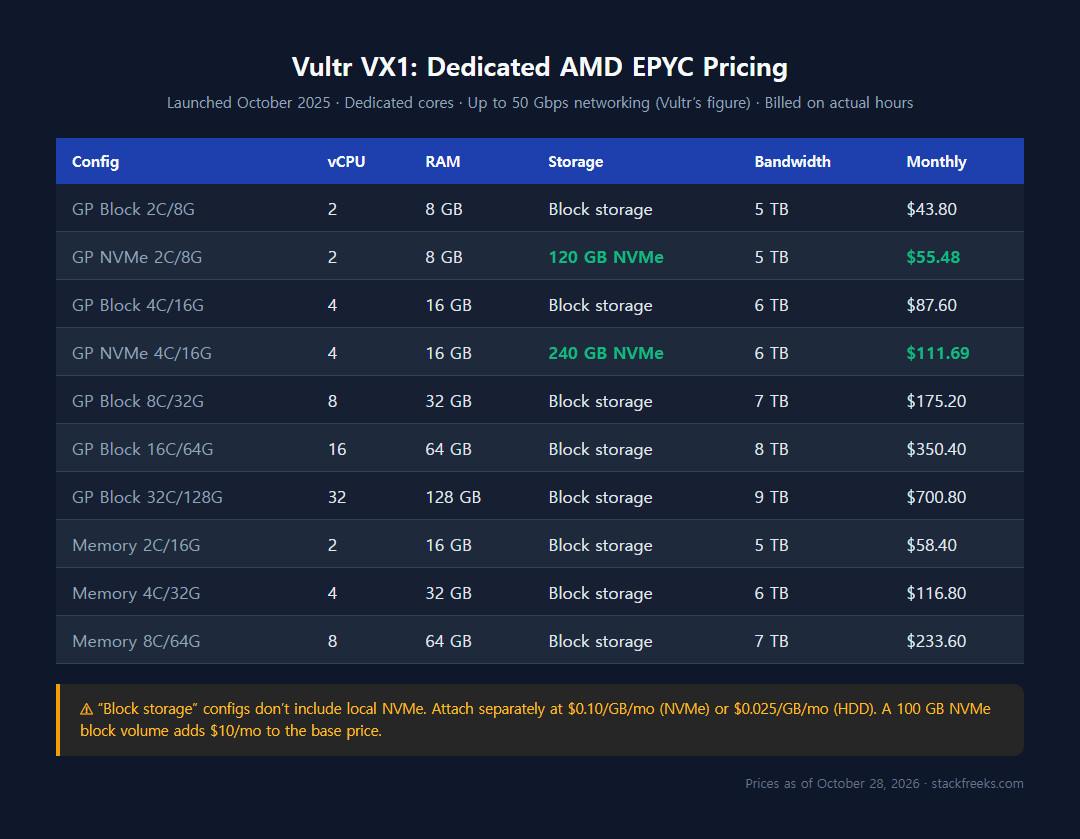
VX1 Cloud Compute (launched October 2025)
Vultr’s newest compute tier launched on October 21, 2025. Vultr’s pricing page claims up to 82% better performance per dollar than leading hyperscalers’ cost-efficiency-optimized plans, and its launch blog says the baseline is their most cost-effective Arm-based plans. That is Vultr’s own figure (checked October 28, 2026), not an independent test.
VX1 runs on AMD EPYC with dedicated cores and up to 50 Gbps networking, and Vultr says it provisions in under 15 seconds.
| Config | vCPU | RAM | Storage | Bandwidth | ~Monthly |
|---|---|---|---|---|---|
| GP Block 2C/8G | 2 | 8 GB | Block storage | 5 TB | $43.80 |
| GP NVMe 2C/8G | 2 | 8 GB | 120 GB NVMe | 5 TB | $55.48 |
| GP Block 4C/16G | 4 | 16 GB | Block storage | 6 TB | $87.60 |
| GP NVMe 4C/16G | 4 | 16 GB | 240 GB NVMe | 6 TB | $111.69 |
| GP Block 8C/32G | 8 | 32 GB | Block storage | 7 TB | $175.20 |
| GP Block 16C/64G | 16 | 64 GB | Block storage | 8 TB | $350.40 |
| GP Block 32C/128G | 32 | 128 GB | Block storage | 9 TB | $700.80 |
| Memory 2C/16G | 2 | 16 GB | Block storage | 5 TB | $58.40 |
| Memory 4C/32G | 4 | 32 GB | Block storage | 6 TB | $116.80 |
| Memory 8C/64G | 8 | 64 GB | Block storage | 7 TB | $233.60 |
Note that the “Block storage” configs don’t include local NVMe; you attach block storage separately at $0.10/GB/month for NVMe or $0.025/GB/month for HDD. For a typical 100 GB NVMe block volume, that adds $10/month on top of the base price.
Optimized Cloud Compute (dedicated AMD EPYC / NVMe)
Older than VX1 but still relevant for production workloads needing guaranteed resources. Three sub-tiers cover most scenarios:
| Config | vCPU | RAM | NVMe Storage | Monthly |
|---|---|---|---|---|
| GP 1C/4G | 1 | 4 GB | 30 GB | $30.00 |
| GP 2C/8G | 2 | 8 GB | 50 GB | $60.00 |
| GP 4C/16G | 4 | 16 GB | 80 GB | $120.00 |
| CPU-Opt 2C/4G | 2 | 4 GB | 50 GB | $40.00 |
| Mem-Opt 1C/8G | 1 | 8 GB | 50 GB | $40.00 |
| Mem-Opt 2C/16G | 2 | 16 GB | 100 GB | $80.00 |
Bare Metal and GPU pricing
Bare Metal removes the virtualization layer entirely. You get a physical server with no noisy neighbor risk, full hardware access, and predictable performance. Vultr’s Bare Metal range is wide:
| Configuration | Monthly |
|---|---|
| Intel Xeon E3-1270 (4C / 32 GB RAM) | $120.00 |
| AMD EPYC 9255 | $995.00 |
| 2× AMD EPYC 9354 (64 cores / 1.5 TB RAM) | $2,925.00 |
| GPU-attached configs (8× A100 up to 8× B200) | $7,000 to ~$45,700/mo |
$120 entry checked October 28, 2026 on Vultr’s pricing page; larger monthly figures from Vultr’s plan API, October 5, 2026.
Cloud GPU (on-demand, per GPU/hour)
Vultr’s GPU pricing is on-demand by the GPU-hour, which suits AI inference and batch training jobs that don’t run 24/7.
| GPU | Per GPU/Hour |
|---|---|
| NVIDIA HGX B200 (192 GB VRAM, 8-GPU node) | $3.500 |
| AMD MI355X (288 GB, 8-GPU node) | $2.590 |
| NVIDIA HGX H100 SXM (80 GB, per GPU in an 8-GPU node) | $2.300 |
| AMD MI325X | $2.000 |
| NVIDIA GH200 | $1.990 |
| NVIDIA L40S | $1.671 |
| AMD MI300X (bare metal prepaid from $1.750) | $1.850 |
| NVIDIA A16 (entry) | $0.471 |
The NVIDIA A16 at $0.471/hour is the most accessible GPU option for inference tasks that don’t need a full A100-class card, about $344/month if you run it for a full 730-hour GPU billing month. The B200 at $3.50 per GPU per hour is the top of the list: about $2,555 per GPU for a 730-hour month, or about $20,440 for the 8-GPU node.
Hidden costs that could double your Vultr bill
1. Stopped instances still charge you at full rate
Vultr’s most counterintuitive billing rule: powering off an instance doesn’t stop the billing. When you stop an instance, Vultr continues charging the full hourly rate because the server still occupies reserved resources: vCPUs, RAM, NVMe storage, and the assigned IPv4 address. The only way to completely stop charges is to destroy the instance.
2. Automatic backups add 20% to plan cost
Vultr’s automated backup feature costs an additional 20% of the base instance price. A $24/month High Performance plan becomes $28.80/month with backups enabled. Backups aren’t on by default, but Vultr presents them as a recommended option during deployment, and it’s easy to check that box without realizing the ongoing cost.
3. Snapshots cost $0.05/GB/month indefinitely
Snapshots are billed at $0.05/GB/month for as long as they exist. A 100 GB NVMe instance snapshot costs $5/month. If you snapshot before major updates and forget to clean up old ones, costs accumulate silently.
4. Bandwidth allowance accrues hourly, not up front
Vultr introduced account-level bandwidth pooling in January 2023 and set a unified global overage rate of $0.01/GB (inbound is free). That rate is low, but the allowance has a sharp edge: according to Vultr’s bandwidth docs, each running instance adds its share of bandwidth hour by hour (monthly cap ÷ 672) on top of the account’s 2 TB free egress, and overage applies whenever total outbound transfer exceeds what has been allocated so far that month.
A plan with a 2 TB monthly allocation accrues roughly 3 GB per hour. A big transfer early in the month, or on a server you just deployed, can outrun the pool accrued so far and trigger overage charges before the rest of the month’s allowance arrives. At $0.01/GB, every 1 TB over the allocation adds $10.
5. Additional IPv4 addresses cost extra
Vultr’s FAQ says most plans include one IPv4 address and up to two more are available for an extra fee; it gives no price (check the current rate in the console). Multi-site setups or apps requiring multiple IPs see this compound quickly.
6. Windows licenses: $16/month and up
Running Windows on Vultr adds a Microsoft licensing fee of $16/month on the smallest Windows plan ($10/month, 2 GB), and the fee grows with the vCPU count on larger plans. On that $10 plan, the license costs 160% of the server.
7. Block storage and object storage
- NVMe Block Storage: $0.10/GB/month
- HDD Block Storage: $0.025/GB/month
- Object Storage (Standard): $18/TB/month
- Object Storage (Accelerated): $100/TB/month
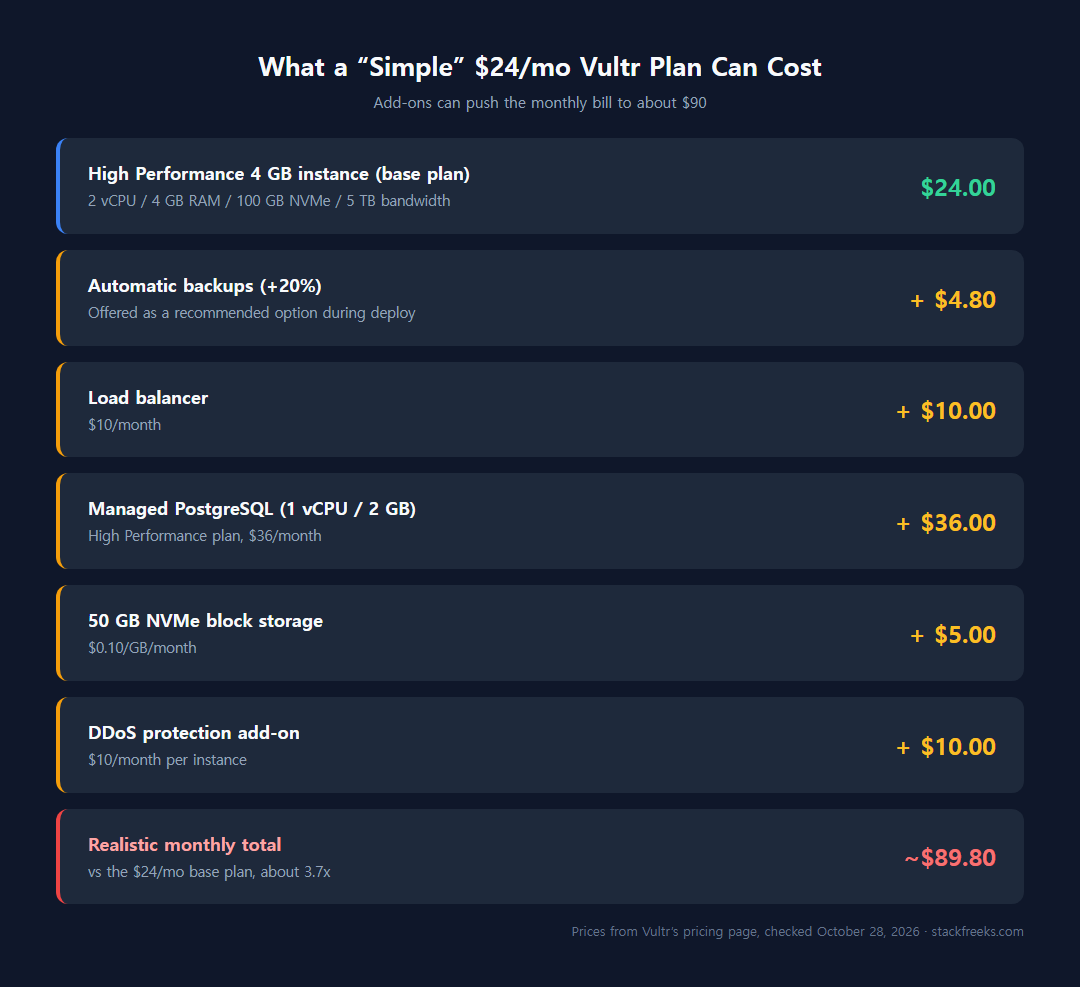
What a “simple” web app actually costs
| Component | Monthly |
|---|---|
| High Performance 4 GB instance | $24.00 |
| Automatic backups (20%) | $4.80 |
| Load balancer | $10.00 |
| Managed PostgreSQL (1 vCPU / 2 GB) | $36.00 |
| 50 GB NVMe block storage | $5.00 |
| DDoS protection add-on | ~$10.00 |
| Realistic total | ~$89.80/month |
Which Vultr plan should I pick? Recommendations by use case
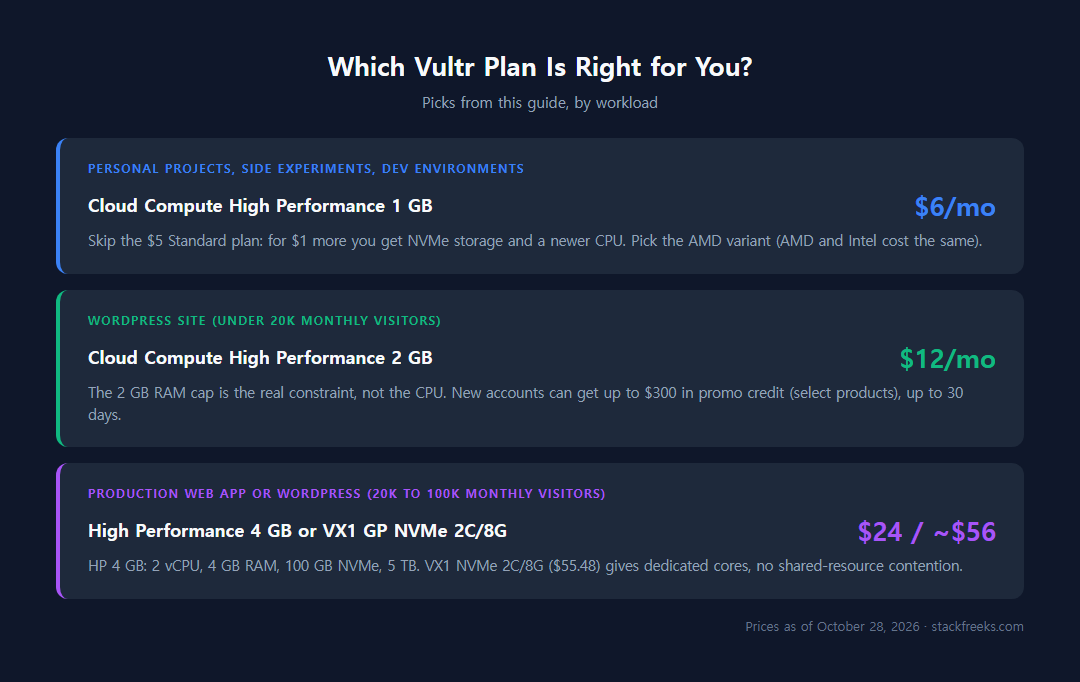
Personal projects, side experiments, dev environments
Pick: Cloud Compute High Performance 1 GB ($6/month)
Skip the $5/month Standard plan. For $1 more you get NVMe storage and a newer CPU; pick the AMD variant (AMD and Intel cost the same), which reported EPYC-Rome in our Tokyo test. Enable backups only if losing the instance would hurt (that’s an extra $1.20/month).
WordPress site (under 20k monthly visitors)
Pick: Cloud Compute High Performance 2 GB ($12/month)
The 2 GB RAM cap is the real constraint, not the CPU. WordPress’s PHP process + MySQL + any caching plugin fits comfortably in 2 GB for sites under 20k monthly visitors. New Vultr accounts can get up to $300 in free credit with a promo code, and Vultr’s docs say free credits last up to 30 days, enough to run a first month while you validate traffic.
Production web app or WordPress site (20k to 100k monthly visitors)
Pick: Cloud Compute High Performance 4 GB ($24/month) or VX1 GP NVMe 2C/8G (~$56/month)
The HP 4 GB is the workhorse plan: 2 vCPUs, 4 GB RAM, 100 GB NVMe, 5 TB bandwidth. If you need guaranteed CPU performance with no shared-resource contention, step up to the VX1 NVMe 2C/8G at $55.48/month. Dedicated cores eliminate the noisy neighbor risk that plagues shared VPS during peak hours.

