
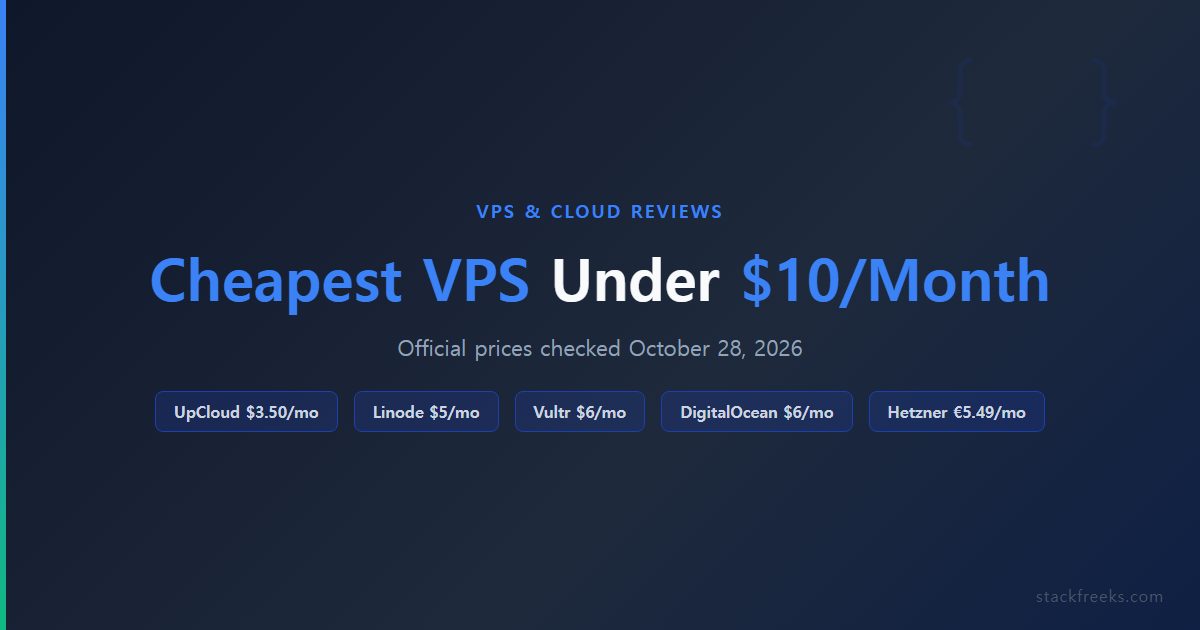
The cheapest VPS plans on official price lists (checked October 28, 2026) are Vultr at $2.50/month IPv6-only or $3.50 with IPv4 (0.5 GB RAM), UpCloud Starter at $3.50 (1 GB RAM, 10 GB SSD) and DigitalOcean at $4 (512 MiB). At $5, Vultr Regular and Linode’s Nanode both give 1 vCPU, 1 GB and 25 GB. Hetzner’s 4 GB CX23 (€5.49) showed “not available” that day.
This comparison draws on official pricing pages and our own short benchmark of Vultr’s $5 and $6 plans. This list covers five providers that genuinely deliver under $10/month, plus one bonus entry you should know about before clicking “Buy Now.”
Quick comparison: best cheap VPS 2026 at a glance
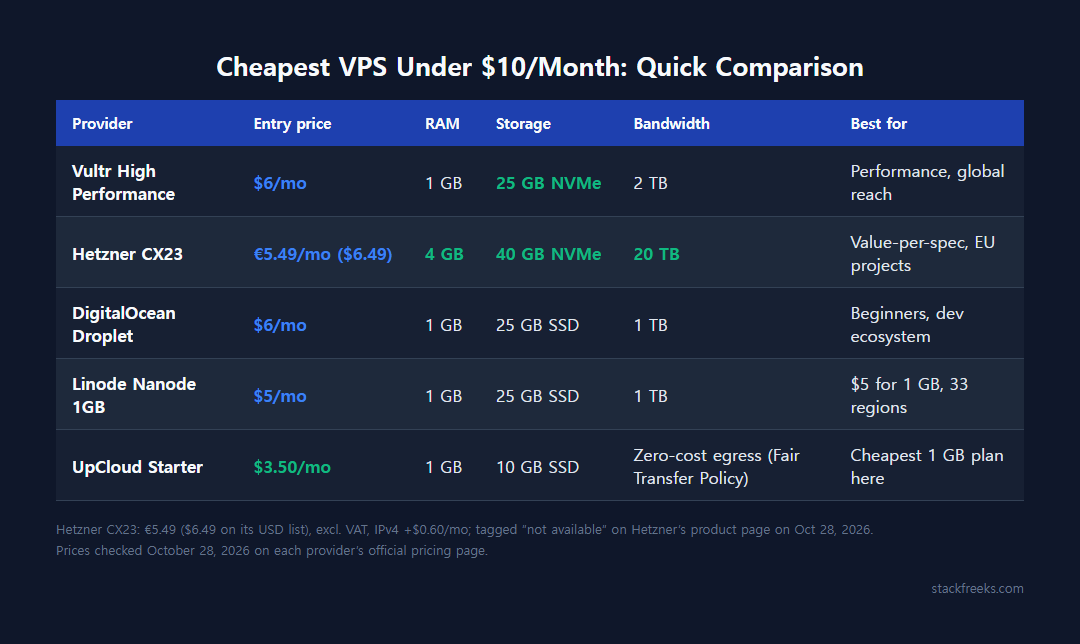
| Provider | Entry Price | RAM | Storage | Bandwidth | Best For |
|---|---|---|---|---|---|
| Vultr High Performance | $6/mo | 1 GB | 25 GB NVMe | 2 TB | Performance, global reach |
| Hetzner CX23 | €5.49/mo ($6.49) | 4 GB | 40 GB NVMe | 20 TB | Value-per-spec, EU projects |
| DigitalOcean Droplet | $6/mo | 1 GB | 25 GB SSD | 1 TB | Beginners, dev ecosystem |
| Linode Nanode 1GB | $5/mo | 1 GB | 25 GB SSD | 1 TB | $5 for 1 GB, 33 regions |
| UpCloud | $3.50/mo | 1 GB | 10 GB SSD | Zero-cost egress (Fair Transfer Policy) | Cheapest 1 GB plan here |
Prices checked October 28, 2026 on Vultr’s pricing page, Hetzner’s June 15, 2026 price adjustment table, DigitalOcean Droplet pricing, Linode’s public plan API, UpCloud pricing and Hostinger VPS.
#1 Vultr: $6 for 1 GB on NVMe, 33 regions in its API
Vultr lists 33 regions in its API (its site now says 34), which immediately sets it apart from the EU-first options on this list. Its Regular plans start at $2.50/month (IPv6 only, 0.5 GB) and $5 for 1 GB, but the real sweet spot is the $6/month High Performance tier. This is where you get newer AMD EPYC or Intel Xeon CPUs (same price; our test below used the AMD version) paired with NVMe SSD, not the standard SSD you find in cheaper tiers. (Vultr’s $6 High Frequency plan is a separate 3GHz+ Intel option at the same price.)
In October 2025, Vultr launched VX1 instances: dedicated latest-generation AMD EPYC cores rather than shared vCPUs. They are not a budget tier: VX1 starts at $0.060/hour (2 vCPU / 8 GB), about $43.80 for a 730-hour month, and is billed on actual hours rather than capped at 672, well above this list’s $10 ceiling. For a small production workload like a WooCommerce store or a Node.js API that has outgrown shared vCPUs, it is the step up worth knowing about.
What you actually get at $6/month:
- 1 shared vCPU
- 1 GB RAM
- 25 GB NVMe SSD
- 2 TB outbound bandwidth
- Hourly billing capped at 672 hours/month
Vultr’s billing is hourly, which is useful if you’re spinning up test environments. Bandwidth overage runs $0.01/GB. Backups add 20% to the base cost; snapshots cost $0.05/GB/month; neither is included by default, so factor that in if you need either.
Vultr pros & cons
Pros:
- NVMe on every High Performance plan
- 33 regions in Vultr’s API, in 20 countries (Linode’s API also lists 33)
- Hourly billing with no long-term commitment
- VX1 dedicated-core tier (from $0.060/hr) available when you outgrow shared vCPUs
Cons:
- Backups cost extra (20% surcharge); not automatic
Best for: Developers who want NVMe storage and a wide choice of regions and are comfortable managing their own infrastructure.
Not ideal for: Memory-hungry apps at this price: the $6 plan has 1 GB RAM, a quarter of Hetzner’s CX23.
$5 vs $6 at Vultr: the extra dollar bought 5.3x the CPU score in our test
On a budget list, the tempting move is to grab each provider’s cheapest plan. We checked whether that holds at Vultr by benchmarking its $5 Regular plan and the $6 High Performance AMD plan recommended above, both in Tokyo on 2026-09-25 (Ubuntu 24.04, one run each): sysbench cpu --threads=1 --time=30, a 30-second fio 4k random read at queue depth 32, and a 30-second fio 1M sequential write. We also had one Regular-class box running in Singapore that day. This is the only provider on the list we measured ourselves; everything about the others comes from published pricing.
| Instance | CPU (lscpu) | sysbench 1 thread (events/s) | 4k random read (IOPS) | 1M seq write |
|---|---|---|---|---|
| Regular $5, Tokyo | Intel Broadwell | 817.61 | 59.7k | 308 MiB/s |
| High Performance AMD $6, Tokyo | AMD EPYC-Rome | 4303.83 | 107k | 1816 MiB/s |
| Singapore box (plan not recorded) | Intel Broadwell | 729.89 | 52.1k | 440 MiB/s |
Our test, 2026-09-25. The Singapore instance’s plan ID isn’t in its log; only its region and CPU model are certain.
The dollar matters more than the sticker suggests. The $6 AMD plan did 4303.83 events/s to the $5 plan’s 817.61, about 5.3x, and 1.79x the random-read IOPS (107k vs 59.7k). If you’re choosing Vultr from this list, the $5 Regular plan is a false economy for anything CPU- or disk-bound. Keep it for a static site or a tunnel endpoint.
The Singapore row is a reminder of how much a single run can move. Same Broadwell CPU model as the Tokyo Regular box, yet it came in lower on CPU (729.89 vs 817.61) and random reads (52.1k vs 59.7k) and higher on sequential writes (440 vs 308 MiB/s). Gaps of 10 to 45% between single samples can be host noise; a 5x gap is not. The full three-plan run, raw output included, is in our Vultr Cloud Compute vs High Frequency benchmark.
Honest scope: one 30-second sample per instance on one day, mostly in one region. It’s a snapshot, not a long-term average, and says nothing about the other providers ranked here.
#2 Hetzner: unbeatable value if EU data centers work for you
Hetzner is the “no-brainer” pick. The CX23 plan at €5.49/month ($6.49 on Hetzner’s USD price list, plus $0.60 for an IPv4 address) gives you 4 GB RAM and 2 vCPUs, four times the RAM you get from Vultr or DigitalOcean at $6/month. The inclusion of 20 TB outbound bandwidth (compared to 1 to 2 TB from the US cloud providers) is the other number that makes developers do a double-take.
Important 2026 price note: Hetzner raised prices for new orders and rescales from June 15, 2026 (existing servers keep their old terms); the adjustment took the CX23 from €3.99 to €5.49 (+38%). The CX23 is the successor to the older CX22, which is no longer on Hetzner’s plan list. Despite the increase, Hetzner still offers significantly more spec per euro than any US-based competitor at equivalent pricing. One caveat: on 2026-10-28 Hetzner’s product page still tagged the CX23 (and CX33) “not available”, so check that you can actually order one before planning around it.
What you get on the CX23 at €5.49/month:
- 2 shared vCPUs (Intel or AMD depending on datacenter)
- 4 GB RAM
- 40 GB NVMe SSD
- 20 TB outbound traffic
- DDoS protection, IPv6 and firewall, included at no extra charge (a public IPv4 address is €0.50/month extra)
Hetzner pros & cons
Pros:
- Best specs per dollar on this list: 4 GB RAM and 20 TB bandwidth at $6.49/month
- Strong European data protection posture (GDPR-compliant by default)
- DDoS protection, firewall, and IPv6 all included at no extra cost
Cons:
- Cheap CX plans only in the EU (Germany, Finland); the US (Ashburn, Hillsboro) and Singapore locations start at much pricier CPX plans; no South America
- No affiliate program, and its referral program has been discontinued
- Shared vCPUs mean performance varies under noisy-neighbor conditions
- A June 15, 2026 price hike (+31 to 38% on CX plans), though value remains strong
Best for: European developers, teams with GDPR requirements, or any project where EU data residency is a requirement. Also the obvious choice if you’re running high-bandwidth workloads on a budget.
Not ideal for: Teams that need data centers in South America, or budget pricing in the US or Asia-Pacific (Hetzner’s Ashburn, Hillsboro and Singapore locations don’t offer the cheap CX plans).
#3 Linode (Akamai Connected Cloud): $5 for 1 GB in 33 regions
Linode was acquired by Akamai in 2022 and rebranded as “Akamai Connected Cloud,” though most developers still call it Linode and the control panel still lives at cloud.linode.com. More importantly: the Nanode 1 GB plan at $5/month ($0.0075/hour on Akamai’s public API) is a dollar under DigitalOcean’s 1 GiB Droplet at $6.
Nanode 1 GB plan specs ($5/month):
- 1 shared vCPU
- 1 GB RAM
- 25 GB SSD storage
- 1 TB outbound bandwidth
- 33 core regions (Linode API, October 28, 2026)
The trade-off is that 1 GB RAM is genuinely tight for anything beyond a small app or low-traffic site. If you’re running WordPress with a few plugins and moderate traffic, you’ll feel the constraint.
Linode pros & cons
Pros:
- $5/month for 1 GB RAM, 25 GB SSD and 1 TB transfer, a dollar under DigitalOcean’s 1 GiB Droplet
- 33 core regions, the same count as Vultr’s API
Cons:
- 1 GB RAM at $5/month is resource-constrained for real workloads
- No widely publicized affiliate program as of mid-2026
- “Akamai” rebrand has created some brand confusion; documentation is split between old and new branding
Best for: Small apps that need a $5, 1 GB server in a region the EU-first providers on this list don’t cover.
Not ideal for: Memory-heavy applications, or anyone who needs more than 1 GB RAM and doesn’t want to pay more than $5/month (upgrade to the next Linode tier at $12/month).
#4 DigitalOcean: best developer ecosystem, but you pay for it
DigitalOcean is the one most developers reach for first. The onboarding experience is clean, the documentation is excellent, and the ecosystem of managed databases, Kubernetes, managed Redis, and the App Platform means you can grow into more managed services without switching providers. For many teams, that ecosystem lock-in is worth the price premium compared to bare-metal alternatives.
The basic Droplet at $6/month gives you 1 vCPU, 1 GiB RAM, 25 GB SSD, and 1 TB outbound bandwidth. As of January 1, 2026, DigitalOcean switched from hourly to per-second billing (with a 60-second minimum), which is useful for short-lived compute tasks.
Where the bill can creep up:
The $6 base price is real, but:
- Weekly backups add 20% to the Droplet price (daily backups add 30%)
- Load Balancers add $12/month
- Bandwidth overage is $0.01/GiB, pooled across Droplets in the same team account
For pure VPS value, the $6 Droplet has a quarter of the RAM of Hetzner’s $6.49 CX23 and half the transfer of Vultr’s $6 High Performance plan. The developer experience justifies a premium, but know that you’re paying for the ecosystem, not the raw compute.
DigitalOcean pros & cons
Pros:
- Best developer experience and documentation of any provider on this list
- 20 data centers in 13 regions (16 open for new resources)
- Per-second billing (since Jan 2026), useful for burst workloads
- Managed databases, Kubernetes, App Platform available as you scale
Cons:
- Spec-per-dollar lags behind Hetzner and Vultr at equivalent price points
- Backups cost extra (20 to 30% surcharge); not included by default
- Load Balancers ($12/month) are needed for production HA setups
Best for: Developer teams who want a clean platform to grow on, beginners who’ll benefit from DigitalOcean’s tutorial library, or projects that will eventually need managed databases or Kubernetes without spinning up AWS.
Not ideal for: Budget-first projects where you need maximum RAM and bandwidth for the money, or solo developers who won’t use the ecosystem features that justify the price.
#5 UpCloud: the cheapest 1 GB plan at $3.50
UpCloud is a Finnish cloud provider that doesn’t get nearly enough attention in the budget VPS conversation. Its Starter plan is $3.50/month (a global price, limited to 5 concurrent Starter deployments per customer), the cheapest 1 GB plan on this list. Starter runs on standard-performance SSD and previous-generation AMD CPUs; UpCloud’s MaxIOPS storage is on its other plan lines, not Starter.
What you get at $3.50/month:
- 1 shared vCPU
- 1 GB RAM
- 10 GB standard SSD storage and 250 Mbit/s
- IPv4 included, zero-cost egress under UpCloud’s Fair Transfer Policy
- 99.99% uptime SLA
UpCloud’s pricing page says all plans include zero-cost egress and that a Fair Transfer Policy applies, so read that policy before you plan a bandwidth-heavy project around it. Vultr and DigitalOcean charge $0.01/GB over their allowances. Billing is by the started hour, capped at 28 days a month.
UpCloud pros & cons
Pros:
- Lowest price on this list for 1 GB RAM with IPv4
- Zero-cost egress (Fair Transfer Policy applies)
- Transparent pricing with no hidden fees
- 99.99% uptime SLA
Cons:
- 10 GB storage at the base plan is tight (vs. 25 GB from Vultr/DO/Linode)
- Smaller community and fewer tutorials than DigitalOcean or Linode
- No widely publicized affiliate program
Best for: Small sites, bots and test boxes that fit in 1 GB RAM and 10 GB of disk, where the lowest monthly price matters most.
Not ideal for: Projects that need 25+ GB storage on the base tier without upgrading, or developers who rely heavily on community forums and third-party tutorials.
Bonus: Hostinger VPS (read this before you buy)
Hostinger deserves a mention because its KVM 1 plan looks extraordinary on paper: 4 GB RAM, 1 vCPU, 50 GB NVMe SSD, and 4 TB bandwidth for $6.49/month on a 24-month term ($155.76 up front). Only Hetzner’s CX23 matches that RAM at the same price.
The catch: KVM 1 renews at $11.99/month, 85% above the $6.49 intro rate, according to Hostinger’s own page on October 28, 2026. KVM 2 goes from $8.79 to $14.99.
Hostinger VPS is a reasonable option if:
- You only need hosting for the 24-month intro term
- You’ll actively migrate or renegotiate before renewal
- You’re using it as a staging environment and plan to wind it down
It’s a poor choice if you’re building anything that needs to stay online long-term at a predictable cost. The $11.99/month renewal puts it well outside the “$10/month” budget category that this article covers.
Vultr’s $6 tier is the best all-around pick
For most developers reading this, Vultr’s $6/month High Performance tier is the top all-around pick: NVMe storage, 33 regions in its API, a VX1 dedicated-core upgrade path, and hourly billing make it the most flexible option at this price.
If you’re in Europe or your project can run on EU servers: Hetzner is the better deal, full stop. Four GB RAM, 20 TB bandwidth, and DDoS protection at $6.49/month is an offer no US cloud provider can match at this tier in 2026. Check that the CX23 is orderable first; it showed as not available on 2026-10-28.
For the cheapest usable box: UpCloud’s $3.50 Starter gives 1 GB with 10 GB of disk; at $5, Linode’s Nanode and Vultr’s Regular plan both give 1 vCPU, 1 GB and 25 GB. Only the Vultr plan is in our test above, where the $6 tier scored 5.3x its CPU result.
And if someone pitches you Hostinger VPS at $6.49/month, check the renewal price first.
Prices last verified October 28, 2026. Hetzner pricing reflects the June 15, 2026 adjustment.

