As of Oct 28, 2026: Claude Code is included in Claude plans from Pro ($20/month) and runs in a terminal, VS Code or JetBrains. Cursor costs $8 (Plus, Grok models only) to $200 (Ultra); Claude and GPT models cost extra at API rates from Premium ($30) up. Copilot runs $10 to $100 and lists the most IDEs. Devin Pro is $20. Gemini Code Assist is closed to new buyers.
Quick comparison: best AI coding assistants 2026
| Tool | Free Tier | Paid plans (monthly) | Best For |
|---|---|---|---|
| Claude Code | No (needs a paid Claude plan or Console account) | Pro $20, Max 5x $100, Max 20x $200 | Complex agentic tasks, multi-file refactors |
| Cursor | Free plan ($0) | Plus $8 (Grok only), Premium $30, Super $100, Ultra $200 | AI-first editor experience |
| GitHub Copilot | 2,000 completions/mo, limited chat and agent use | Pro $10, Pro+ $39, Max $100 | Mixed-IDE teams, GitHub-heavy workflows |
| Windsurf / Devin Desktop | Yes (light quota, unlimited Tab and inline edits) | Pro $20, Max $200 | Autonomous multi-file agent tasks |
| Gemini Code Assist | Stopped after June 18, 2026 | New Standard/Enterprise sales closed after Oct 9, 2026 | Existing Google Cloud contracts only |
Prices checked 2026-10-28 on claude.com/pricing, cursor.com/pricing, GitHub’s Copilot plans docs and devin.ai/pricing.
The short version: Claude Code is the agent for big multi-file jobs, Cursor is a full AI editor, and Copilot covers the most IDEs from $10 a month. Devin Desktop is the Windsurf editor under Cognition’s Devin brand. You can also pair an editor with Claude Code: its VS Code extension installs into Cursor too.
1. Claude Code (Anthropic): best AI coding assistant for complex tasks
Claude Code is Anthropic’s coding agent for complex multi-file tasks. It started as a terminal CLI and now also runs as a VS Code extension, a JetBrains plugin, a desktop app and on the web, according to Anthropic’s Claude Code docs. It needs a paid Claude plan or a Claude Console account; the free Claude plan doesn’t include it.
Pricing
| Plan | Cost | Notes |
|---|---|---|
| Claude Pro | $20/mo | Includes Claude Code ($17/mo billed annually) |
| Max 5x | $100/mo | Heavier usage limits |
| Max 20x | $200/mo | Power users / teams |
| API pay-as-you-go | From $1/1M input tokens | Haiku 4.5: $1/$5; Sonnet 5: $2/$10; Opus 5.5: $4/$20 |
Prices checked 2026-10-28 on claude.com/pricing and Anthropic’s API pricing page (input/output per 1M tokens).
Weaknesses: Terminal-first. If you spend your day in VS Code or JetBrains and don’t want to context-switch to a terminal, the workflow friction is real. There’s a VS Code extension and an official JetBrains plugin, still labeled Beta, that runs the CLI in the IDE terminal.
Best for: Developers working on complex, multi-file tasks; teams doing large refactors or migrating codebases.
Not for: Developers who want an AI assistant that lives inside their editor and handles autocomplete as they type. That’s Cursor or Copilot’s territory.
2. Cursor: best AI coding IDE experience
Cursor is a standalone AI code editor with native apps for macOS, Windows and Linux, and AI built into the editing experience at every level. On paid plans its agent also works inside JetBrains IDEs through ACP, with JetBrains AI Assistant 2025.1+, per Cursor’s JetBrains docs.
Max Mode is now limited to legacy request-based plans, where it bills at the API rate plus 20%.
Because the AI is built into the editor itself rather than added as a plugin, the in-editor experience is designed differently from Copilot’s. The visual diff system in Composer Agent makes it easy to review AI-generated changes before accepting them. Tab completions are fast and accurate.
Pricing
| Plan | Cost | Notes |
|---|---|---|
| Free | $0 | No third-party models |
| Plus | $8/mo | Grok models only |
| Premium | $30/mo | 4x Plus usage; Claude, GPT and Gemini billed at API rates from prepaid credit |
| Super | $100/mo | 15x Plus usage |
| Ultra | $200/mo | 50x Plus usage |
| Teams | $30+/user/mo | Premium, Super or Ultra seats |
Prices checked 2026-10-28 on cursor.com/pricing. The usage pool for Cursor models refreshes weekly. Pro and Pro+ are legacy plans for existing customers; Cursor’s pricing docs list no price for them.
Weaknesses: It’s its own editor, so JetBrains users get the agent through ACP rather than the full Cursor experience. Billing is split between a weekly Cursor-model pool and prepaid API-rate credit for third-party models, which takes some reading.
Best for: Developers who want the most polished AI-integrated editor. Premium at $30/month is the entry plan for Claude and GPT models; Plus at $8 is enough if Grok models are.
Not for: JetBrains users who want a native experience, or teams that need the widest possible IDE coverage.
3. GitHub Copilot: best AI coding assistant for IDE breadth
GitHub Copilot has the longest official IDE list in this comparison. GitHub’s docs name VS Code, Visual Studio, JetBrains IDEs, Eclipse and Xcode, and the copilot.vim plugin covers Vim and Neovim (checked Oct 28, 2026). If your team spans different editors, it’s the one tool here documented for all of them.
On June 1, 2026, Copilot switched from Premium Request Units (PRUs) to GitHub AI Credits (token-based billing). Inline code completions and next-edit suggestions are now free on all paid plans and don’t consume AI Credits. Chat, agent mode, code review, and Copilot CLI draw from your credit pool. This billing change is actually an improvement for developers who use Copilot primarily for autocomplete.
The GitHub integration is genuinely good. Copilot’s Coding Agent receives a GitHub issue, writes the code, creates a pull request, self-reviews its changes, and runs security scans, all autonomously. For teams already living in GitHub, this workflow automation is a real differentiator.
The free tier gives you 2,000 code completions/month plus limited chat and agent use, enough for occasional use, but you’ll hit the ceiling quickly if you use it daily.
Pricing
| Plan | Cost | Notes |
|---|---|---|
| Free | $0 | 2,000 completions/mo, limited chat and agent use |
| Pro | $10/mo | 1,500 AI credits ($15) included |
| Pro+ | $39/mo | 7,000 AI credits ($70) included |
| Max | $100/mo | 20,000 AI credits ($200), priority access to premium models |
| Business | $19/user/mo | 1,900 credits per user, team management |
| Enterprise | $39/user/mo | 3,900 credits per user |
Prices checked 2026-10-28 on GitHub’s Copilot plans docs. 1 AI credit = $0.01; credits reset on the 1st of each month with no carryover.
Weaknesses: Chat, agent mode and the coding agent draw on the monthly credit pool at each model’s API rate, so heavy agent use can outrun the included credits. Past that you set a dollar budget or wait for the reset.
Best for: JetBrains users, teams with mixed IDE environments, developers deeply integrated with GitHub workflows, or anyone who wants a $10/month plan with Claude, GPT and Gemini models on the list.
Not for: Developers who want top-tier agentic performance on complex, multi-file projects. For that, Claude Code or Cursor will serve you better.
4. Windsurf (now Devin Desktop): best agentic coding editor
Windsurf now goes by Devin Desktop: windsurf.com redirects to devin.ai/pricing, where the Teams plan names Devin Desktop (checked Oct 28, 2026). Built by Codeium and acquired by Cognition, it now sells alongside Cognition’s Devin agent plans.
The core feature remains Cascade, Windsurf’s agentic system that plans multi-step code changes, executes terminal commands, reads linter output, and modifies files across an entire project with full codebase awareness. This is the feature that made Windsurf stand out before the rebrand, and it’s still the main reason to choose this tool.
Outside its own editor, the Windsurf plugin runs in JetBrains IDEs 2024.3 and later; Devin’s current compatibility page lists no other editors.
Pricing
| Plan | Cost | Notes |
|---|---|---|
| Free | $0 | Light quota, unlimited Tab and inline edits |
| Pro | $20/mo | Individual plan |
| Max | $200/mo | Power users |
| Teams | $80/mo + $40/seat/mo | Team plan fee plus $40 per full dev seat |
Prices checked 2026-10-28 on devin.ai/pricing.
Weaknesses: Less in-editor precision than Cursor for hands-on editing.
Best for: Developers who want strong autonomous multi-file editing.
Not for: Developers who want granular in-editor control over every AI suggestion, or anyone uncomfortable with the pace of change around the Cognition acquisition.
5. Gemini Code Assist (Google): closed to new buyers
Gemini Code Assist is no longer an option for a new setup. Google’s deprecation page says the individual (free), Google AI Pro and Google AI Ultra versions stopped serving requests after June 18, 2026, and points those users to Google’s Antigravity products. After October 9, 2026, new Standard and Enterprise subscriptions can’t be purchased; existing ones keep working until their contract ends.
If your company already pays for Standard or Enterprise, it still runs in VS Code, JetBrains IDEs, Android Studio, Cloud Shell Editor and Cloud Workstations, with up to 1,500 (Standard) or 2,000 (Enterprise) agent-mode and Gemini CLI requests per user per day. Annual renewals end after January 31, 2027 and monthly renewals after December 31, 2027, so plan the move.
Not for: anyone choosing an assistant today. For a free start, Copilot Free (2,000 completions a month), Cursor’s Free plan (no third-party models) and Devin’s Free plan (unlimited Tab and inline edits) are what’s left on this list; Claude Code needs a paid plan.
IDE support side by side
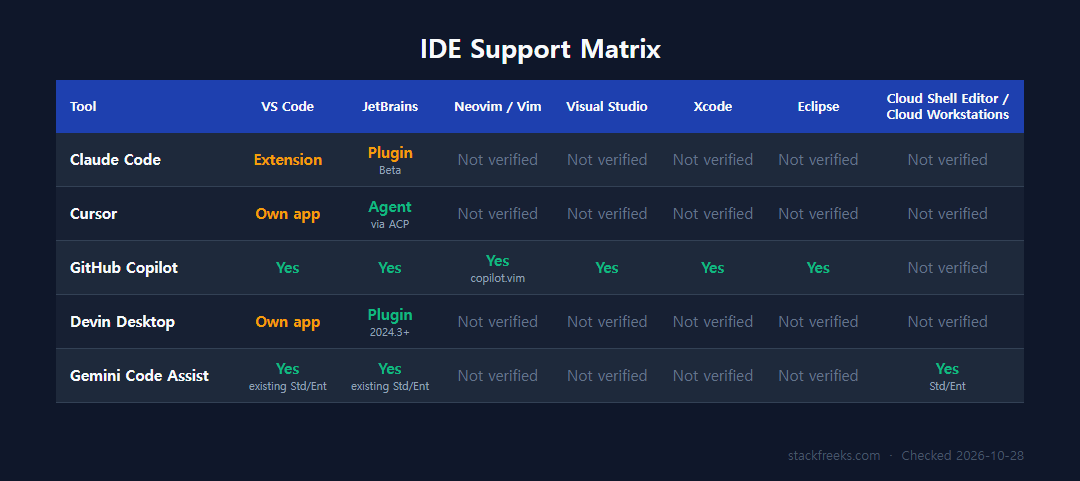
| Tool | VS Code | JetBrains | Neovim/Vim | Visual Studio | Xcode | Eclipse | Google Cloud |
|---|---|---|---|---|---|---|---|
| Claude Code | Extension | Plugin (Beta) | Not verified | Not verified | Not verified | Not verified | Not verified |
| Cursor | Own app | Agent via ACP | Not verified | Not verified | Not verified | Not verified | Not verified |
| GitHub Copilot | Yes | Yes | Yes (copilot.vim) | Yes | Yes | Yes | Not verified |
| Devin Desktop | Own app | Plugin (2024.3+) | Not verified | Not verified | Not verified | Not verified | Not verified |
| Gemini Code Assist | Yes (existing Standard/Enterprise) | Yes (existing Standard/Enterprise) | Not verified | Not verified | Not verified | Not verified | Yes (Cloud Shell Editor, Cloud Workstations) |
Copilot has the longest official IDE list on this page. JetBrains users have more than one choice: Claude Code has an official JetBrains plugin (still labeled Beta, it runs the CLI inside the IDE terminal), Cursor’s agent works in JetBrains IDEs through ACP on paid plans, and the Windsurf plugin supports JetBrains 2024.3+. “Not verified” means the vendor docs checked on Oct 28, 2026 don’t list that editor.
How to choose: the decision framework
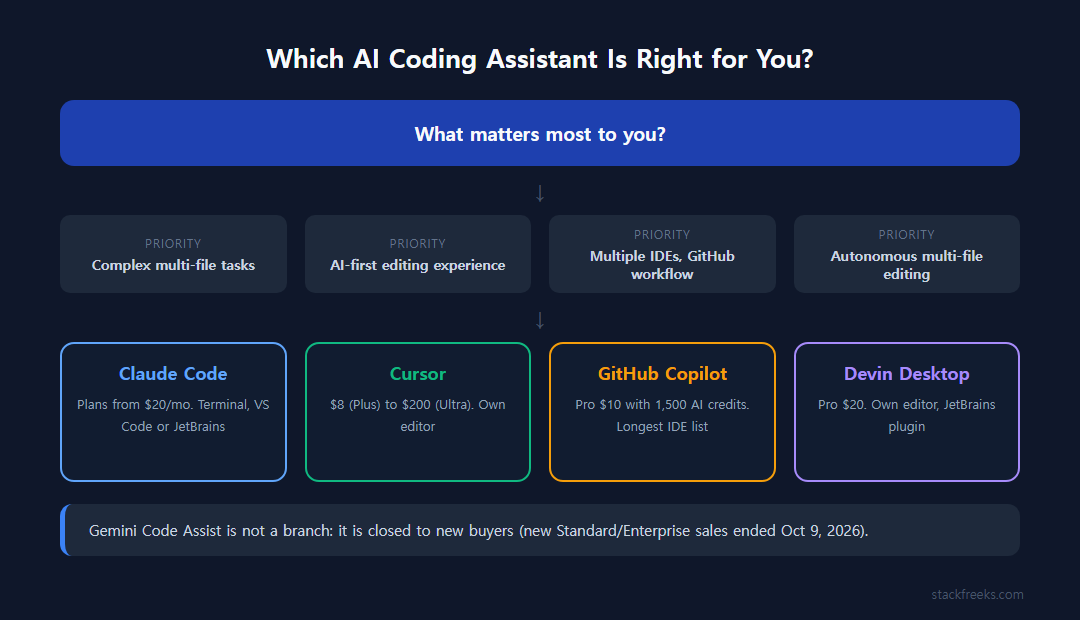
The useful question is “which tool is best for your specific workflow.”
Choose Claude Code if you’re working on complex, multi-file projects, you’re comfortable in the terminal (or its VS Code and JetBrains integrations), and a Claude plan from $20/month fits. If you’re doing serious agentic tasks (refactoring large codebases, running autonomous multi-step workflows), it’s the pick on this list.
Choose Cursor if you want an AI-first editor with AI integrated at every level of the editing experience. Start on Premium at $30/month if you want Claude or GPT models (billed at API rates from prepaid credit); Plus at $8 covers Grok models only. Not the right choice if you want to stay inside JetBrains or your priority is autonomous long-running tasks rather than in-editor assistance.
Choose GitHub Copilot if your team spans multiple IDEs (especially if JetBrains is in the mix), you’re deeply integrated with GitHub workflows, or you want a $10/month plan with 1,500 AI credits included. Business ($19) and Enterprise ($39) seats add team management.
Choose Devin Desktop (formerly Windsurf) if you want strong autonomous multi-file editing in its own editor, with a JetBrains plugin as a fallback. The Cascade system is still one of the better autonomous agent implementations in the editor space. Watch this one, because the Cognition acquisition is changing it fast.
Skip Gemini Code Assist for a new setup: Google stopped the individual version after June 18, 2026 and closed new Standard and Enterprise sales after October 9, 2026. Existing Standard and Enterprise customers can keep using it until their contracts end.