
This post contains affiliate links. If you purchase through our links, we may earn a commission at no extra cost to you.
Ask how much RAM Meilisearch needs and you’ll get answers ranging from “about 1 GiB” to “35 GB per gigabyte of JSON,” usually with no measurement behind either. So we ran it. If you want to Self-Host Meilisearch on a budget VPS, here’s what v1.54.0 actually used on a $5, 1 GB plan while indexing the official 31,944-document movies dataset: the peak, where it settled, what landed on disk, and one memory setting that didn’t do what its name suggests.
The Short Answer: 1 GB Was Enough for 32K Documents
On a 1 vCPU / 1 GB Vultr plan, Meilisearch indexed a 16.2 MB, 31,944-document JSON file in about 30 seconds, peaked at roughly 395 MiB of resident memory, settled at 242.8 MiB afterwards, and was never OOM-killed. The box still had headroom: the highest total used memory we recorded on the host was 743 MiB of 955 MiB.
That doesn’t mean 1 GB works for every dataset. Our dataset was small, we ran each test once (twice for the main 1 GB indexing run), and we never found the point where 1 GB breaks. But it does mean the “you need at least 2 GB” and “RAM scales 35x with your data” advice you’ll find elsewhere doesn’t match what happened on a real box.
At a glance:
| What we measured (1 GB plan) | Result |
|---|---|
Idle, empty database (docker stats) | 21.71 MiB |
| Indexing time, 31,944 docs | 30.3 s (repeat: 31.2 s) |
Peak resident memory (VmHWM) | 404,224 kB (~395 MiB) |
Settled 60 s after indexing (docker stats) | 242.8 MiB |
| Database on disk | 182M, 11.8x the raw JSON |
Warm search latency (processingTimeMs) | 3–10 ms |
| OOM kills | None |
What We Ran: Meilisearch v1.54.0 on $5 and $10 Vultr Plans
The test ran on 2026-09-26 in Vultr’s Tokyo region on two fresh Ubuntu 24.04 instances:
- 1 GB plan (vc2-1c-1gb): 1 vCPU, 1 GB RAM, 25 GB SSD, $5/month
- 2 GB plan (vc2-1c-2gb): 1 vCPU, 2 GB RAM, 55 GB SSD, $10/month
Both got Docker 29.8.1 via the official get.docker.com script (73 s on the 1 GB box, 52 s on the 2 GB box), then Meilisearch v1.54.0, the release published on 2026-09-21. If you want to repeat it, a $5 Vultr Cloud Compute plan is the exact box we used; any 1 GB VPS with Docker will do. Our walkthrough on installing Docker on a fresh Vultr VPS covers the steps before this.
The core commands, with the image pinned to an exact tag instead of :latest:
docker pull getmeili/meilisearch:v1.54.0
docker run -d --name meili -p 7700:7700 -e MEILI_MASTER_KEY="$MK" \
  -v /root/meili_data:/meili_data getmeili/meilisearch:v1.54.0

curl -sL -o /root/movies.json https://www.meilisearch.com/docs/assets/datasets/movies.json

curl -X POST 'http://localhost:7700/indexes/movies/documents?primaryKey=id' \
  -H 'Content-Type: application/json' -H "Authorization: Bearer $MK" \
  --data-binary @movies.json
The master key was generated on the box with openssl rand -hex 24. The pull took 8 seconds, the image is 480MB, and the container answered /health 1,651 ms after docker run. The dataset is the one linked from Meilisearch’s own Cloud quick start: 16,166,201 bytes, 31,944 movies with title, overview, genres, poster and release date.
While indexing ran, a background sampler recorded memory every 0.5 seconds from three angles: the container’s cgroup total, the number docker stats shows, and the process’s anonymous memory (heap). After the task succeeded we waited 60 seconds, read the kernel’s peak-RSS counter (VmHWM), dropped the page cache, and checked dmesg for OOM kills.
What Self-Hosted Meilisearch Actually Used During Indexing
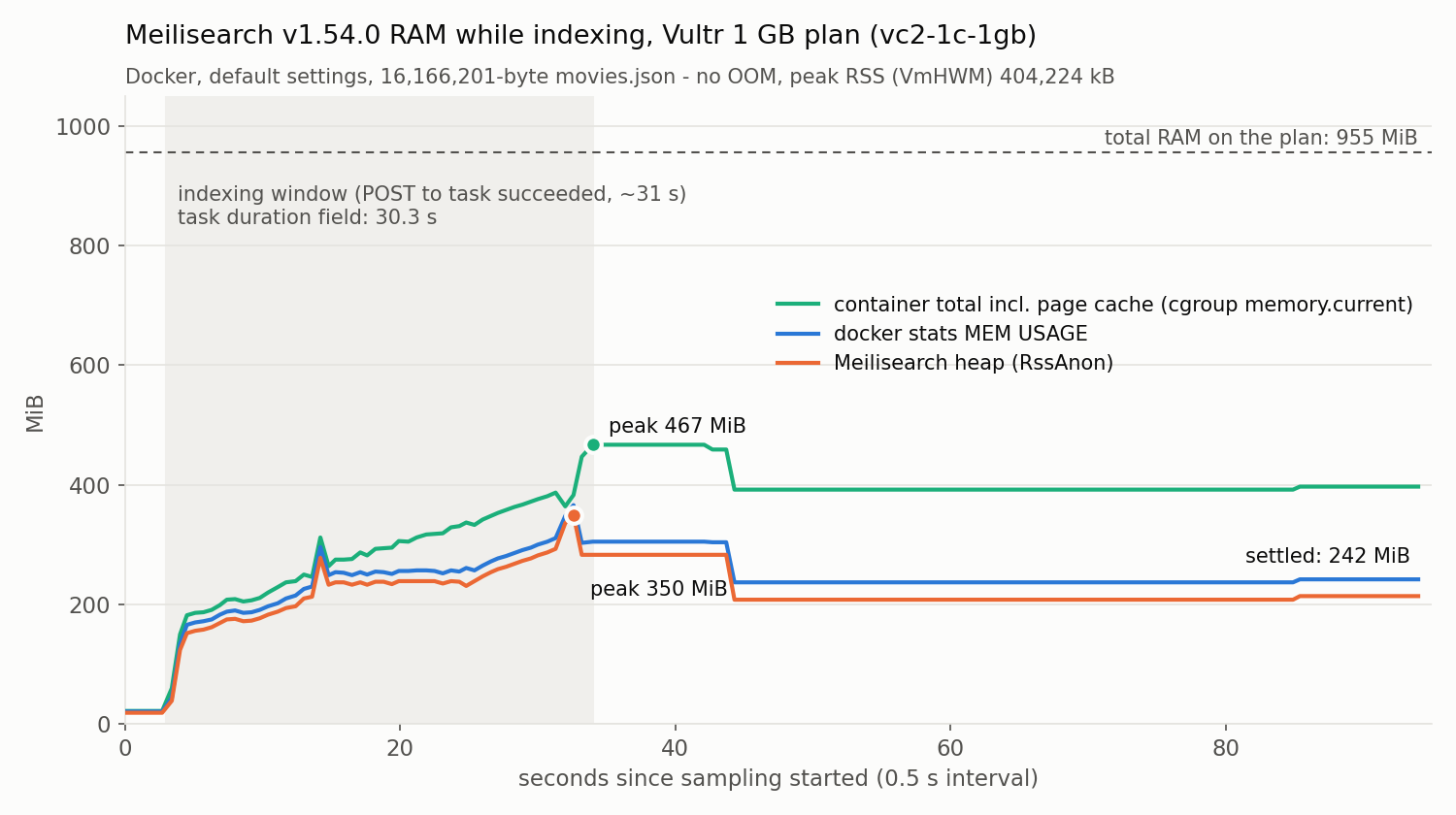
| Metric | 1 GB run 1 | 1 GB run 2 | 2 GB |
|---|---|---|---|
| Task duration | 30.3 s | 31.2 s | 40.9 s |
Peak RSS (VmHWM) | 404,224 kB | 420,056 kB | 430,228 kB |
Peak docker stats value | 366 MiB | 400 MiB | 395 MiB |
| Peak container total incl. page cache | 467 MiB | 481 MiB | 524 MiB |
Peak host used (free -m) | 721 MiB | 743 MiB | 780 MiB |
Settled, 60 s later (docker stats) | 242.8 MiB | 274.7 MiB | 242.8 MiB |
| After dropping page cache | 224.1 MiB | 245.5 MiB | 213.1 MiB |
| OOM | None | None | None |
Four things in that table are worth reading twice.
The 2 GB box didn’t use meaningfully more or less. Peak and settled memory were about the same on both plans, because this dataset never got near 1 GB. The 2 GB plan also indexed slower (40.9 s), but with a single sample that’s far more likely CPU or neighbour variance than anything about RAM. If you see swings like that on your own box, checking CPU steal time is the first thing to look at.
docker stats understates the footprint. It excludes inactive page cache, so while it showed at most 366 MiB, the container’s cgroup total peaked at 467 MiB. If you set a Docker memory limit, size it against the bigger number. Our guide to Docker container memory limits explains how that accounting works.
The resident memory here is mostly heap, not mapped index pages. Meilisearch stores data in LMDB, a memory-mapped database, and the official Storage docs explain that the OS decides how much of the index sits in RAM. You’d expect RSS to be mostly file-backed pages. It wasn’t: after indexing, the file-backed part (RssFile) was only about 29 MB while the data file was 190 MB, and dropping the page cache barely moved the heap (219,260 kB before, 219,300 kB after). The roughly 215–220 MiB left over is real allocated memory that stays around.
Memory drops after the task says it’s done. The heap stayed elevated for about 10 seconds after the task reported succeeded, then fell from around 285 MiB to around 210 MiB (around t≈44 s on the chart). If you’re checking memory right after an import, wait a minute.
Two more details from the same runs. Swap wasn’t the reason it fit: Vultr’s Ubuntu image ships a 2.3 GB swapfile on the 1 GB plan, but Meilisearch’s own VmSwap stayed at 0 kB and the whole host used just 10–12 MiB of swap. And top will show a virtual size (VIRT) of about 2 TiB, 2,170,906,028 kB, for a 182 MB index. Meilisearch’s docs and its engineering blog both explain this as address-space reservation, not memory in use. Ignore it.
The one thing that did eat into the 1 GB before Meilisearch even started: the OS plus an idle Docker daemon. free -m reported 350 MiB used right after installing Docker. Plan around that number, not around Meilisearch alone.
The “1 GB of JSON Needs 35 GB of RAM” Claim Doesn’t Hold Up
If you’ve searched for Meilisearch RAM usage, you’ve probably seen the claim that a 1 GB JSON dataset needs about 35 GB of RAM. It’s not from Meilisearch. It traces back to a Webdock guide (“Selfhosting MeiliSearch with Webdock for 5 Bucks,” updated 2025-09-30) that took the docs’ small movies example, about 305 MB of RAM for a JSON file under 10 MB, and multiplied it by 116. AI search summaries now repeat it as if it were a rule.
The official docs say the opposite. The Storage page states that “there is no reliable way to predict the final size of a database,” and adds that a RAM-to-disk ratio around 1/3 doesn’t materially hurt performance, with even about 1/10 working well for many cases. A straight-line multiply isn’t something Meilisearch endorses anywhere.
Our run can’t prove how memory scales; one 16 MB dataset can’t. But it shows where the big multiplier lives. Our 16.2 MB of JSON peaked at about 395–420 MiB of resident memory across three runs and settled at about 214–220 MiB of heap. The number that really exploded was disk: 182M, or 11.8x the input. The one real “0.9 GB became 34 GB” report, GitHub issue #3744, is also about on-disk size, which is likely how the number drifted into RAM folklore.
Disk Is the Real Multiplier: 16 MB Became 182 MB
After indexing with default settings, data.ms was 182M (190,132,522 bytes), 11.8x the 16,166,201-byte JSON. All four runs with default index settings, on both boxes and including the capped run below, landed within about 100 KB of each other. Meilisearch’s own /stats endpoint put the raw document store at 18,726,912 bytes; everything else is search structures.
That lines up with the only concrete sizing rule in the official FAQ: provision “at least ten times the disk space of your raw dataset.” At 11.8x we came in a bit over it, so treat 10x as a floor, not a target. It’s also well under older reports: GitHub #4211 measured this same 31,944-document file at 217 MB on v1.5 back in 2023, and #3744 reported 38–52x. Meilisearch said its v1.12 indexer cut database size by more than 30%, and our 182M on v1.54.0 fits that.
Can you shrink it? Meilisearch 1.12 added two settings for that: prefixSearch and facetSearch. We turned both off before indexing on the 2 GB box:
curl -X PATCH 'http://localhost:7700/indexes/movies/settings' \
  -H 'Content-Type: application/json' -H "Authorization: Bearer $MK" \
  --data '{"prefixSearch":"disabled","facetSearch":false}'
The index came out at 167M, 8.0% smaller than default, and peak RAM didn’t go down. It also changed results: searching star wa still found 838 hits, but the top three became Star Wars, Star Trek: The Motion Picture and Star Trek II, because partial words no longer match as prefixes. For a search-as-you-type box, that’s a bad trade for 15 MB of disk.
Two disk behaviours to plan for. Adding filterable genres and sortable release_date grew the index to 188M. And the Storage docs warn that LMDB doesn’t return space after deletes, so disk usage “tends to increase over time.” On a 25 GB plan where the fresh OS already took 5.9G, budget accordingly.
MEILI_MAX_INDEXING_MEMORY=100Mb Didn’t Lower the Peak
Meilisearch’s docs say indexing uses up to two-thirds of available RAM by default, and point to --max-indexing-memory (env: MEILI_MAX_INDEXING_MEMORY) if you need to rein it in. So we started a fresh container on the 1 GB box with it set to 100 MB and confirmed the variable was present inside the container:
docker run -d --name meili -p 7700:7700 -e MEILI_MASTER_KEY="$MK" \
  -e MEILI_MAX_INDEXING_MEMORY=100Mb \
-v /root/meili_cap:/meili_data getmeili/meilisearch:v1.54.0| Default | With 100Mb cap | |
|---|---|---|
| Task duration | 30.3 s / 31.2 s | 31.4 s |
Peak RSS (VmHWM) | 404,224 / 420,056 kB | 418,764 kB |
| OOM | None | None |
Peak memory with the cap was the same as without it. Scope this carefully: on this small dataset the default two-thirds budget was never close to being reached, so what we showed is that the setting doesn’t push usage below what the process needs here. We didn’t test how it behaves on a big import.
Other people have, though, and their results point the same direction. In GitHub #3725, a user on a 1 CPU / 2 GB VPS set the limit to 100 MB and still got OOM-killed at an anon-rss of 766,100 kB. Meilisearch’s own team investigated in #4764 and found that “LMDB has no restrictions in terms of memory usage for now.” Treat the setting as a hint, not a hard cap. If you run Meilisearch under a Docker memory limit, setting it explicitly is still sensible: the docs say Meilisearch detects total memory with the sysinfo library, and self-hosters have published configs that bind the indexing budget to the container’s cgroup, which suggests it can read the host’s RAM instead of the limit. Just don’t rely on it to prevent an OOM.
The real protections for a small box are the ones the docs list: send documents in smaller batches, and keep searchable, filterable and sortable attributes to what you actually use.
Search Speed on a 1 vCPU Box: 3–10 ms Warm
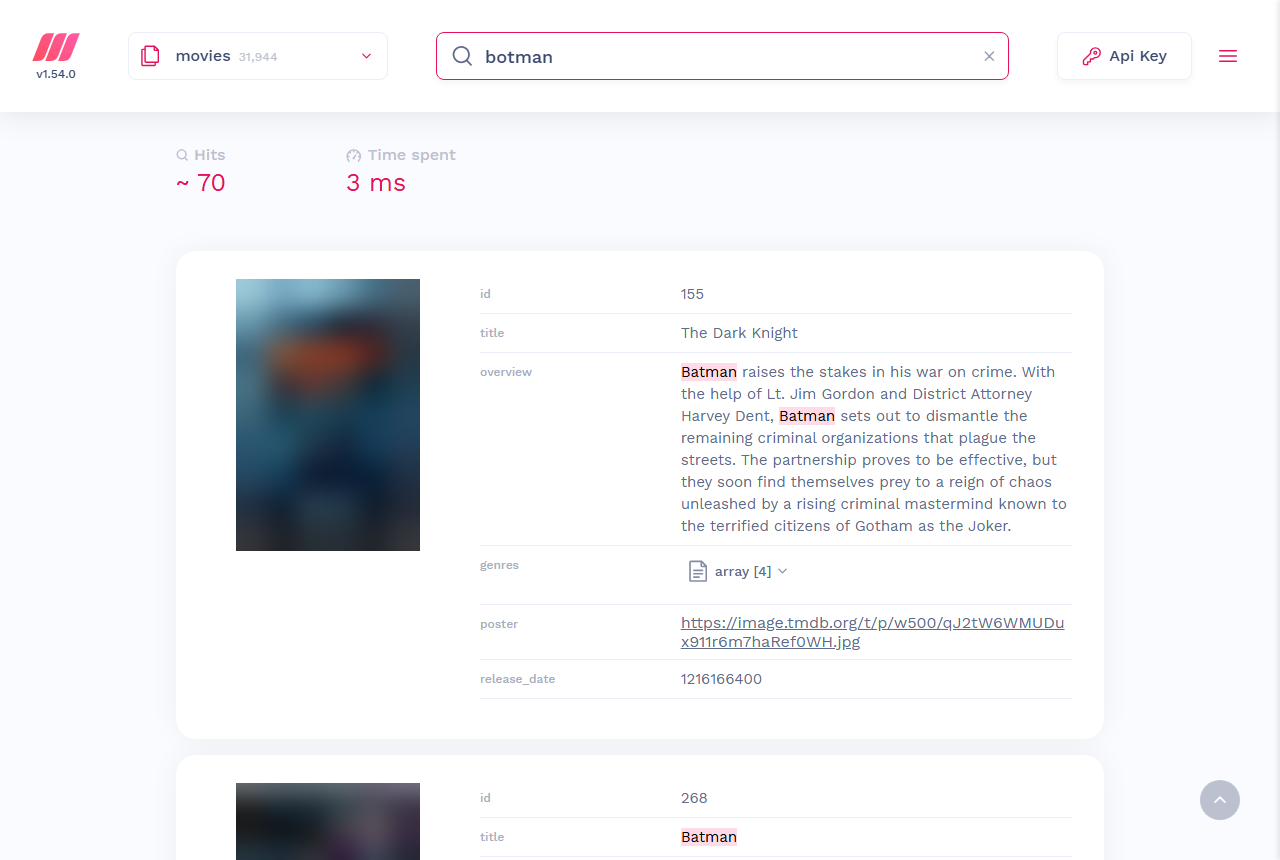
We ran each query three times on the 1 GB box. The first run of each came right after dropping the page cache, so it had to read from disk:
| Query | processingTimeMs (1st, 2nd, 3rd) | Hits | Top result |
|---|---|---|---|
botman (typo) | 69, 3, 3 | 70 | The Dark Knight |
shawshenk redemption (2 typos) | 32, 7, 7 | 2 | The Shawshank Redemption |
star wars | 45, 3, 3 | 838 | Star Wars |
a | 22, 3, 4 | 31668 | Forrest Gump |
space + filter genres = "Science Fiction" | 16, 4, 4 | 282 | Space Jam |
love + filter + sort by release_date:desc | 26, 9, 10 | 1864 | Modern Love |
Cold queries took 22–69 ms; warm ones 3–10 ms. That’s the page-cache effect the Storage docs describe, in practice: RAM affects how fast searches are, not whether they run. Measured from the client side on the same box, 20 botman requests took a median of 0.003642 s, max 0.004108 s.
Adding the filter and sort settings triggered a re-index that took 1.86 s, after which the process sat at 334,100 kB RSS (321.6 MiB in docker stats), noticeably above the 242.8 MiB it settled at with default settings. Every filterable and sortable attribute costs memory and disk, so add them when a feature needs them, not in advance.
Lock It Down Before Your App Talks to It
The screenshot above exists because of a default worth knowing: Meilisearch starts in development mode unless told otherwise. Our logs said Environment: "development", and in that mode GET / on port 7700 served the full mini-dashboard. With MEILI_ENV=production, the same request returned only {"status":"Meilisearch is running"}.
Production mode also enforces the master key. When we started it with a 5-byte key, it refused to start: “The master key must be at least 16 bytes in a production environment.” For a real deployment, run it like this:
docker run -d --name meili --restart unless-stopped \
  -p 127.0.0.1:7700:7700 \
  -e MEILI_ENV=production -e MEILI_MASTER_KEY="$MK" \
  -v /root/meili_data:/meili_data getmeili/meilisearch:v1.54.0
Binding to 127.0.0.1 keeps port 7700 off the internet when your app runs on the same box. If the app lives elsewhere, allow 7700 only from its IP; you can generate the ufw rules with our free firewall rule builder. And keep the exact version tag: releases come every two to four weeks, and a version bump is an upgrade you should plan (dumps for cross-version migration, snapshots for same-version restore), not something :latest does for you on a restart.
One Vultr-specific note: the 1 GB image came with a 2.3 GB swapfile already configured. On providers that ship without swap, add some before your first big import. Our free Linux swap calculator will suggest a size for a 1 GB plan.
What This Test Doesn’t Tell You
Our numbers are real, but narrow. Keep these limits in mind before extrapolating:
- One small dataset. 16 MB of movies is far too small to push a 1 GB plan. A user in GitHub #3725 was OOM-killed on a 2 GB VPS with about 75 MB of text, and Meilisearch’s own #4764 investigation measured indexing peaks of 5.00–5.37 GB on larger datasets. Your data may behave very differently.
- One run per configuration (two for default indexing on 1 GB), one region, minutes not days, and no search traffic while indexing.
- We didn’t find where 1 GB breaks. We know it handled 31,944 documents with room to spare. We don’t know the ceiling.
- Sampling misses short spikes. The 0.5-second sampler caught a heap peak of 350 MiB while the kernel’s
VmHWMrecorded 394.75 MiB in the same run. That’s why the peaks above useVmHWM.
For context, the vendor view: a Meilisearch core developer wrote on Hacker News in April 2025 that limiting resident memory “requires a bare minimum (about 1GiB).” Our run is consistent with that for a small index. It says nothing about a million-document one.
Self-Host Meilisearch on $5 or Pay $23 for Cloud?
| Option | Monthly price | RAM | Disk | Notes |
|---|---|---|---|---|
| Vultr Cloud Compute 1 GB (what we tested) | $5 | 1 GB | 25 GB SSD | You run updates, backups and security |
| Vultr Cloud Compute 2 GB | $10 | 2 GB | 55 GB SSD | Same memory use on our dataset; more headroom |
| Meilisearch Cloud, resource-based XS | $18 + $5 disk = $23 | 1 GB (0.5 vCPU) | 32 GiB billed | Hourly billing |
| Meilisearch Cloud, usage-based (Build) | $30 for 100K docs + 50K searches | Shared, auto-scaling | Managed | Extra searches $0.40 per 1,000; 14-day free trial, no card |
Last updated: 2026-09-26. Meilisearch Cloud prices from its pricing page; Vultr plan prices as provisioned in our test.
The interesting line is Cloud’s entry tier: it’s also a 1 GB RAM instance, at more than four times the price of the box we tested. What the extra $18 buys is someone else running the server: keeping up with a release every few weeks, backups, and keeping it online. That’s worth paying for if you’d rather not own any of it, or if your search is customer-facing and nobody on the team wants to be paged for it.
Self-Host Meilisearch on a $5, 1 GB VPS if your index is in the tens of thousands of documents, you’re comfortable with Docker, and search is a feature rather than the product. Our run says it fits with room left over. Spin up a 1 GB Vultr instance, pin the version, set MEILI_ENV=production, and keep an eye on disk more than on RAM.
Go to 2 GB or pay for Cloud if you’re importing hundreds of thousands of documents or hundreds of megabytes of JSON, or you’ll run heavy imports while users are searching. That’s exactly the territory our test didn’t cover, and it’s where the OOM kill in #3725 and the multi-gigabyte peaks in #4764 come from. Test your own data on a throwaway box first: indexing our file took 30 seconds, so the experiment costs you minutes, not a month.

