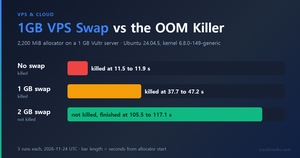
Forgejo RAM usage next to PostgreSQL on a 1 GB Vultr VPS peaked at 414.89 MiB for the two containers combined during a push and clone load we ran on 2026-11-20. Idle, Forgejo used 189.8 MiB and Postgres 47.98 MiB. The lowest free -m available reading was 245 MB, and nothing was OOM-killed. Versions: Forgejo 15.0.12 LTS, PostgreSQL 16.16.
This post contains affiliate links. If you purchase through our links, we may earn a commission at no extra cost to you.
Published advice disagrees. SSD Nodes says to leave PostgreSQL off a 1 GB box, RamNode calls 1 GB the minimum, and a dev.to comparison says 512 MB is comfortable. None of them measured Forgejo and Postgres together on 1 GB, so we did: Postgres defaults, lowered Postgres settings, then SQLite alone, with the same load script each time. Each ran once, with Vultr's default swap file on.
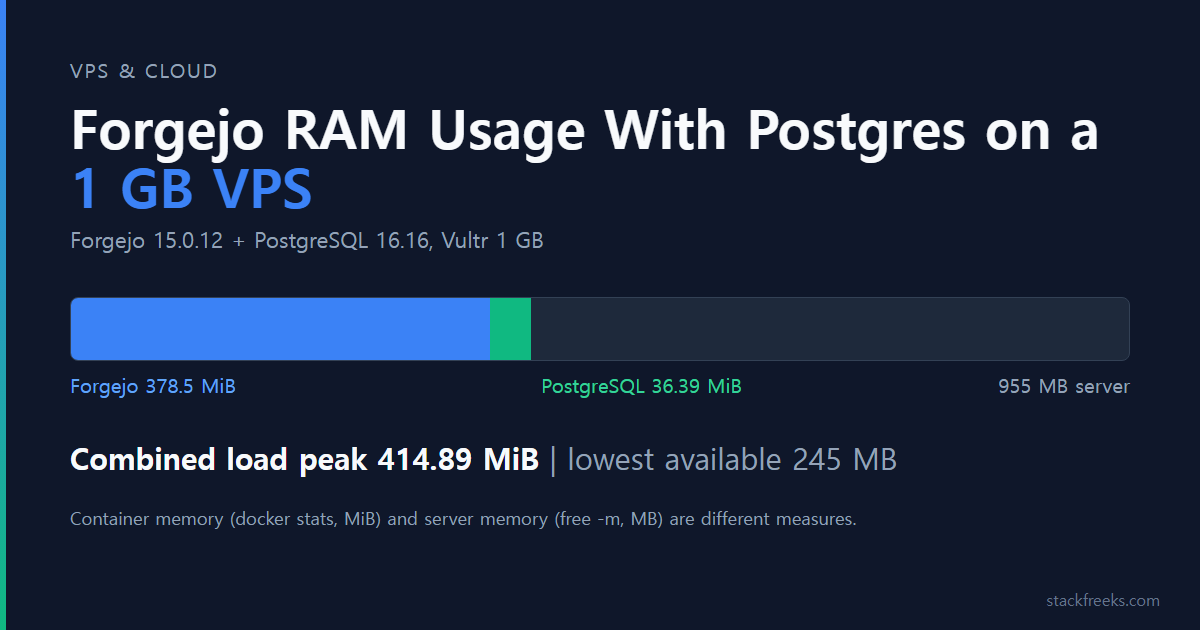
Forgejo RAM usage with Postgres: idle, startup, load and after
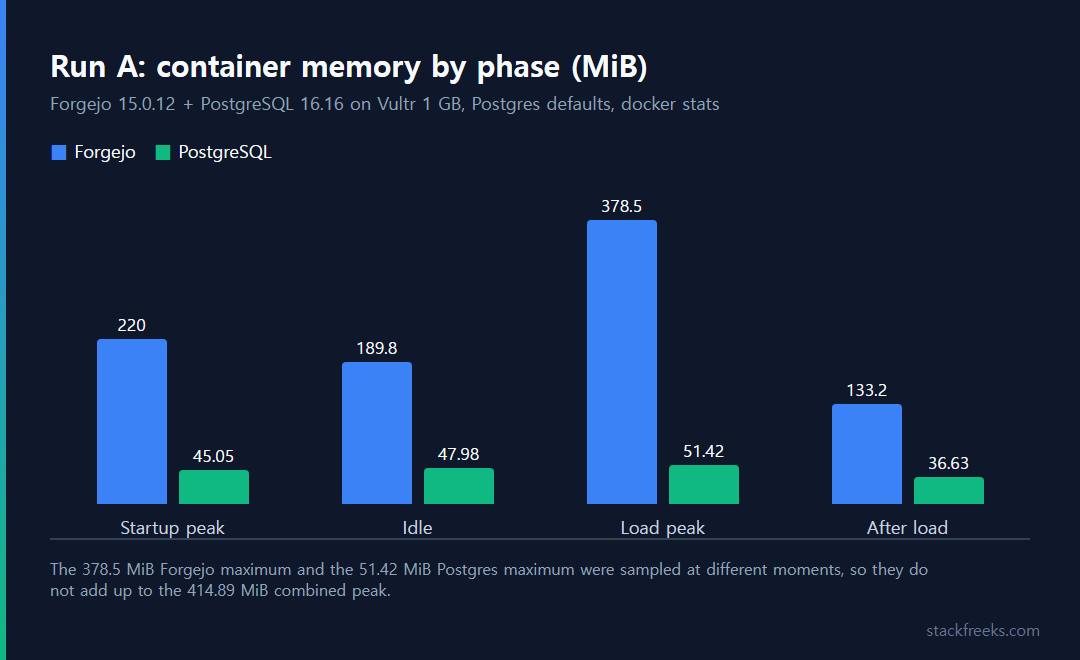
With PostgreSQL defaults, the Forgejo container climbed from 189.8 MiB idle to 378.5 MiB at its load peak and was back at 133.2 MiB two minutes after the load ended. Postgres never went above 51.42 MiB. Both containers reported OOMKilled=false and zero restarts, and dmesg had no OOM lines.
The test box was Vultr's vc2-1c-1gb plan in Tokyo (1 vCPU, 955 MB total in free -m, 25 GB SSD) running Ubuntu 24.04.5 LTS and Docker 29.10.0. Before Docker was installed, the clean server already showed 348 MB used and 607 MB available. The image shipped with a 2399 MB swap file enabled (swapon lists it as 2.3G), and we left it on.
| Phase (Run A, Postgres defaults) | Forgejo container | Postgres container | free -m available | Swap used |
|---|---|---|---|---|
| Clean server, before Docker | n/a | n/a | 607 MB | 0 MB |
| Startup peak, first boot | 220 MiB | 45.05 MiB (max) | 412 MB (lowest) | 31 MB |
| Idle, about 2 min after start | 189.8 MiB | 47.98 MiB | 428 MB | 31 MB |
| Load peak | 378.5 MiB | 51.42 MiB (max) | 245 MB (lowest) | 98 MB (max) |
| 2 min after load | 133.2 MiB | 36.63 MiB | 425 MB | 89 MB |
The combined startup peak was 264.67 MiB, and /api/healthz answered 9 seconds after docker compose up. The combined load peak of 414.89 MiB is one sample with Forgejo at 378.5 MiB and Postgres at 36.39 MiB; Postgres reached 51.42 MiB at a different moment. After Run A, the Forgejo data directory was 219 MB and the Postgres one 72 MB.
Container numbers are docker stats (MiB) and server numbers are free -m (MB, as the tool labels them), so don't add one to the other. Our git clients ran on the same server, so their memory shows up in free -m but in neither container.
How we ran the test
The stack was two Compose services, codeberg.org/forgejo/forgejo:15 and postgres:16-alpine. Forgejo kept its defaults apart from the database connection, URL settings, INSTALL_LOCK=true and disabled registration, with no Actions runner, reverse proxy or HTTPS. docker image ls listed the images at 272MB (Forgejo) and 420MB (Postgres).
A sampler logged docker stats --no-stream and free -m about once per second (251, 238 and 223 samples for runs A, B and C). The load script ran on the server against 127.0.0.1:
- Created 5 users and 20 repositories through the API.
- Pushed 19 generated repos over HTTP, each with 3 commits that each added a file built from 1,000,000 random bytes, base64-encoded.
- Pushed a clone of the Hugo repository whose
.gitdirectory measured 154M indu -sh. - Ran 5 parallel loops for 240 seconds, each doing clone, 3 commits, push and fetch.
- Created 200 issues through the API and sent 150 page requests (repo, issues and commits pages) with
curl.
All 150 page requests returned HTTP 200 in every run. Run A took 507 seconds in total: 69 seconds for the 19 small pushes, 29 seconds for the big push, and 12 to 13 iterations per loop.
Does lowering PostgreSQL settings save RAM on 1 GB?
In this test, lowering PostgreSQL's settings cut Postgres idle memory by 15.65 MiB (47.98 to 32.33 MiB) but didn't lower the combined peak under load. Run B's combined peak was 435.29 MiB against Run A's 414.89 MiB, because the Forgejo container peaked higher at 408.6 MiB.
We set the Run B values with ALTER SYSTEM, recreated both containers and confirmed each with SHOW. Forgejo's default MAX_OPEN_CONNS is 100, above the new 20-connection cap, so we lowered Forgejo's pool too. If you're working out your own values, our free PostgreSQL config generator sizes shared_buffers and work_mem from your RAM.
| Setting | Run A (defaults) | Run B (lowered) |
|---|---|---|
shared_buffers | 128MB | 32MB |
max_connections | 100 | 20 |
work_mem | 4MB | 2MB |
maintenance_work_mem | 64MB | 16MB |
autovacuum_max_workers | 3 | 1 |
Forgejo MAX_OPEN_CONNS / MAX_IDLE_CONNS | default | 10 / 2 |
| Result | Run A | Run B |
|---|---|---|
| Idle: Forgejo / Postgres | 189.8 / 47.98 MiB | 129.3 / 32.33 MiB |
Idle free -m available | 428 MB | 456 MB |
| Load peak: combined containers | 414.89 MiB | 435.29 MiB |
| Load peak: Postgres max | 51.42 MiB | 36.62 MiB |
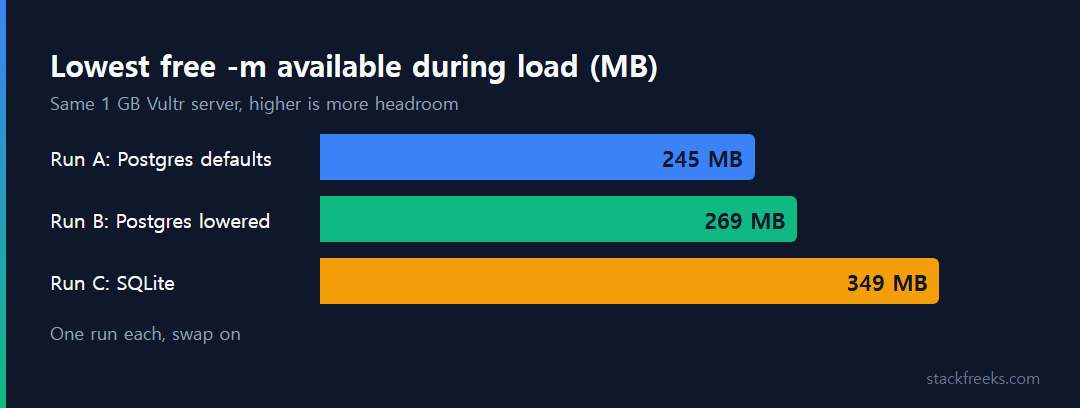
Lowest free -m available | 245 MB | 269 MB |
| Max swap used | 98 MB | 133 MB |
| Load script wall time | 507 s | 477 s |
| 2 min after load: Forgejo / Postgres | 133.2 / 36.63 MiB | 205.6 / 27.24 MiB |
The other rows point different ways: lowest available was 24 MB higher in Run B, but the combined peak was 20.4 MiB higher and swap went 35 MB further. With one run each, and Run B starting with swap already in use, we wouldn't lean on gaps that size. What's clearly about Postgres is its own footprint: 15.65 MiB less at idle and a 36.62 MiB maximum instead of 51.42 MiB.
We measured no time cost: Run B finished the script in 477 seconds against 507. That holds for this load only (5 users, 20 repos, a 72 MB Postgres data directory after Run A). A database with years of issues could need the larger defaults in ways this test can't show.
Forgejo with Postgres vs SQLite on the same 1 GB plan
SQLite used less memory in our run. Forgejo alone on SQLite peaked at 336.2 MiB, which is 78.69 MiB below the 414.89 MiB combined peak of Forgejo plus default Postgres, and the lowest available memory was 349 MB against 245 MB.
| Run C (SQLite, no Postgres container) | Result |
|---|---|
| Idle Forgejo | 145.7 MiB, 462 MB available, 57 MB swap used |
| Load peak | 336.2 MiB, 349 MB lowest available, 119 MB max swap used |
| 90 s after load | 242.6 MiB, 454 MB available, 104 MB swap used |
| Load script wall time | 445 s, 15 iterations per loop |
| OOM / restarts | OOMKilled=false, 0 restarts, 0 dmesg OOM lines |
Run C started on a fresh data directory after the Postgres runs, on a box that had already been swapping. Read the 104 MB gap in lowest available memory as "SQLite left more room in this run", not as a fixed number. Forgejo's memory after load stayed above idle in Run C (242.6 against 145.7 MiB) and Run B (205.6 against 129.3), while in Run A it ended below idle.
Forgejo minimum requirements claims, checked against our numbers
Forgejo publishes no numeric RAM minimum, according to SSD Nodes and ZimaSpace, so the quoted figures come from guides. Four of them against our numbers:
dev.to (selfhosting.sh, March 2026): idle about 120 MB, load about 350 MB, "comfortable" on 512 MB. Our Forgejo container idled at 189.8 MiB (Run A) and 129.3 MiB (Run B), and peaked at 378.5 and 408.6 MiB, so idle was above or close to their ~120 and both peaks were above their ~350. We didn't test a 512 MB plan, so the 512 MB claim is neither confirmed nor ruled out, and the article gives no method.
SSD Nodes (2026-11-19): leave PostgreSQL and the CI runner off a 1 GB box, use SQLite. Our run doesn't support reading this as "Postgres won't fit": the Postgres stack finished with no OOM and 245 MB available at the low point. It does support "SQLite is lighter", since Run C left 104 MB more. SSD Nodes published no measurements, and we didn't test the CI runner half.
RamNode: 1 GB minimum, 2 GB recommended, PostgreSQL recommended for production. The 1 GB minimum held for our load. We didn't test 2 GB, so the recommendation is neither confirmed nor contradicted.
YunoHost forum (2025-01-10): Forgejo CI test peak 231 MB. Our Forgejo startup peak was 220 MiB and its load peak 378.5 MiB. The YunoHost number comes from a packaging test with unstated database and version, and it sits nearer our startup figure.
Which forge to pick is covered in our Forgejo vs Gitea vs GitLab CE comparison, whose rule of thumb was about 2 GB with PostgreSQL and Actions runners. This test covers the PostgreSQL half: without a runner, Postgres fit on 1 GB for our load.
How much room 1 GB leaves for other services
Our headroom call: with PostgreSQL defaults, a 1 GB plan fits Forgejo plus Postgres for a load like ours, plus one small extra service whose own peak stays under about 145 MB. It leaves no measured room for an Actions runner, which we didn't test. The working: the lowest free -m available reading in Run A was 245 MB. Keep a 100 MB cushion for a reverse proxy and for spikes a 1-second sampler can miss, and about 145 MB is left. The 100 MB cushion is our assumption, not something we measured.
For scale, our Vaultwarden measurement on the same plan peaked at 87.72 MiB for 5 users, under 145 whether you read it as MB or MiB. Lowering Postgres settings bought 15.65 MiB at idle and nothing measurable at peak. SQLite moved the low point from 245 to 349 MB, which would leave about 249 MB after the cushion, if that one-run gap holds.
Swap was in use in every run, reaching 98 MB (A), 133 MB (B) and 119 MB (C), so "no OOM" means no OOM with a 2399 MB swap file behind it. Our Linux swap size calculator suggests a size for small plans, and our Docker container memory limits guide shows how to cap neighbouring containers.
Who should not run Forgejo and Postgres on 1 GB
Skip this setup, or test it yourself first, if any of these apply:
- You'll run Forgejo Actions with a runner on the same box. SSD Nodes and our older comparison both name runners as the memory driver, and we didn't test one.
- You want swap off. Every run used swap (up to 133 MB), and we didn't test without it.
- Another service on the box needs more than about 145 MB at its peak, the room left after the cushion in Run A.
- Your load is bigger than ours. We tested 5 users, 20 repos, a 154M repository, 200 issues and 5 parallel push/clone loops for 240 seconds.
What this test did not cover
- One run per configuration. A, B and C ran back to back on one server, so file cache and swap state carried over.
- Swap on. Vultr's 2399 MB swap file was enabled and used in all three runs.
- The load client ran on the server, so git clients counted in
free -mand shared the one vCPU. - About 4 minutes of parallel loops (445 to 507 seconds per run in total), not days of real use.
- Not tested: Actions runners, indexers, reverse proxy, HTTPS, git over SSH, and Forgejo v17. We ran v15.0.12 LTS only.
Pick Postgres on 1 GB if you'll stay small and run no CI
Forgejo RAM usage with PostgreSQL on a 1 GB VPS was 414.89 MiB at the combined peak in our test, with 245 MB available at the lowest point and no OOM. If you're a solo developer or a small team, want Postgres because SQLite serialises writes (the reason SSD Nodes gives for it), and don't plan to run Actions on the same box, a 1 GB Vultr instance (the same vc2-1c-1gb plan we tested, listed at about $5/month by third-party trackers in 2026; check Vultr's pricing page) is enough. Go SQLite if you want the extra room Run C showed. If you need a runner next to it, our numbers don't cover that, and RamNode's 2 GB recommendation is the safer starting point.
Sources: Forgejo config cheat sheet for the MAX_OPEN_CONNS default, PostgreSQL resource settings for the Postgres defaults, and the Forgejo release schedule for the LTS and v17 versions.