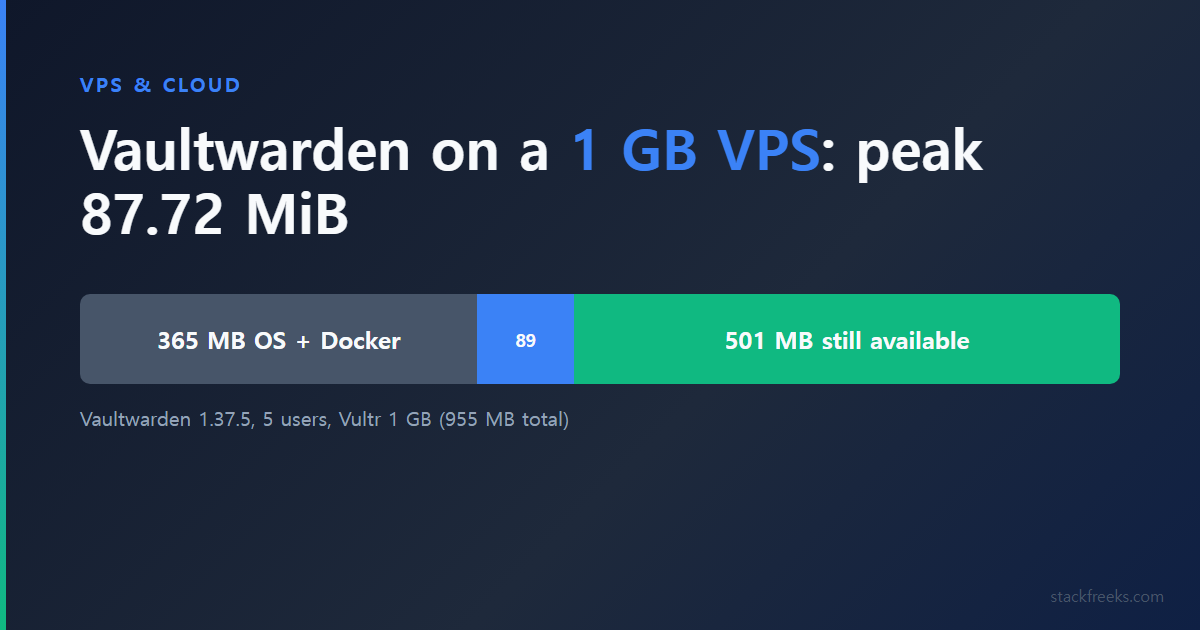
Vaultwarden RAM usage on a 1 GB Vultr VPS peaked at 87.72 MiB while 5 users logged in, imported 800 logins each and synced in parallel. Idle, the same container used 11.14 MiB, and the lowest available memory our sampler recorded during the load was 501 MB. That was Vaultwarden 1.37.5 on SQLite, tested on 2026-11-17.
This post contains affiliate links. If you purchase through our links, we may earn a commission at no extra cost to you.
The number most guides repeat is an idle one. SSD Nodes measured 58 MB for one idle user on a 4 GB host, and other write-ups quote anything from about 10 MB to 80 MB without saying how they got it. None of them shows what happens when several people hit the server at once, which is the moment that decides whether a 1 GB plan is enough. So we ran a short 5-user load on Vultr's cheapest 1 GB plan and logged memory every 2 seconds. It's one run of about 4 minutes; the limits are listed further down.
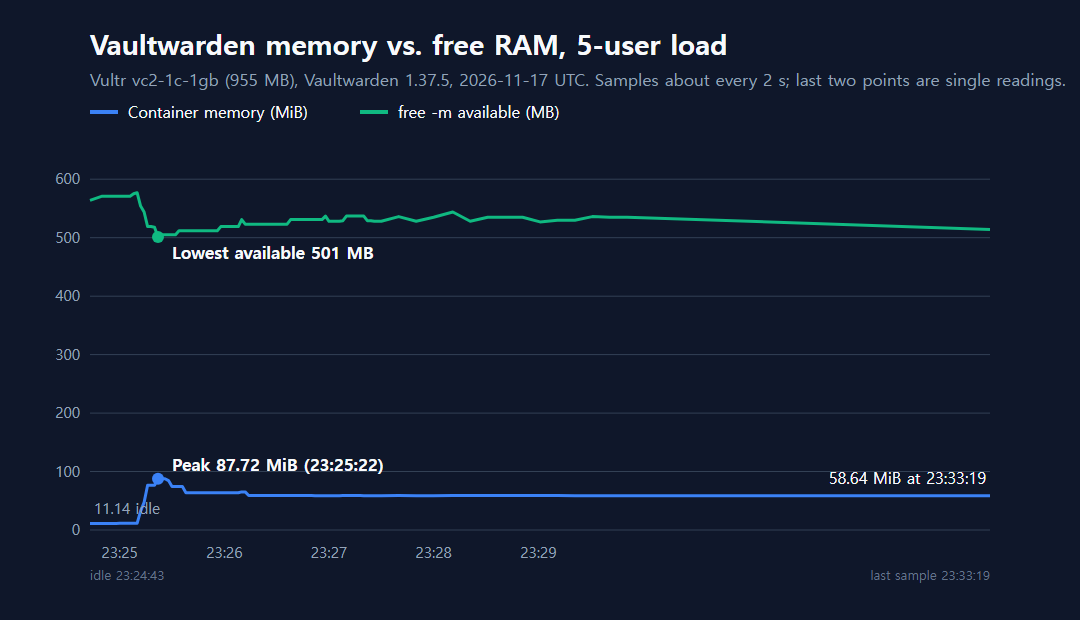
Vaultwarden RAM usage at idle, under 5-user load and after
The container went from 11.14 MiB idle to a sampled peak of 87.72 MiB during the 5-user import, then fell back over about 90 seconds and stayed between 58.63 and 58.89 MiB; it was still at 58.64 MiB more than 2 minutes after the load ended. Nothing was OOM-killed and the container never restarted.
| Phase | Vaultwarden container (docker stats) | Server free -m available | Source file |
|---|---|---|---|
| Clean server, before Docker | n/a | 635 MB (used 320 of 955) | app-step1.txt |
| Docker installed, before Vaultwarden | n/a | 590 MB (used 365) | app-step1.txt |
| First boot, empty data dir | 6.383 MiB first sample, 7.47 MiB max | n/a | app-step5.txt, app-step7.txt |
| Idle, up ~2 min, 5 accounts, no clients | 11.14 MiB (process RSS 40,304 KB) | 564 MB | app-step9.txt |
| 5-user load, peak sample (23:25:22 UTC) | 87.72 MiB | 501 MB (lowest during load) | app-step11.txt |
| After the peak, 23:25:28 to 23:26:50 | fell from 84.45 to 59.06 MiB | n/a | app-step11.txt |
| From 23:26:52 to the last sample | 58.63 to 58.89 MiB | n/a | app-step10.txt, app-step11.txt |
| More than 2 min after load | 58.64 MiB (process RSS 85,508 KB) | 514 MB (used 441) | app-step10.txt |
The peak is almost 8 times the idle reading (87.72 ÷ 11.14 = 7.9). More useful for planning: even after the burst passed, Vaultwarden held about 5 times its idle memory (58.64 ÷ 11.14 = 5.3) and didn't give it back within the 2 minutes we watched. We didn't investigate why or test whether it shrinks later.
All five client sessions finished. Each user logged in, imported 800 generated logins in about 14 to 16 seconds, ran 20 rounds of bw sync plus bw list items, and ended with 800 items in the vault. Swap use was 13 MB of 2,399 MB after the load, and dmesg had no OOM lines.
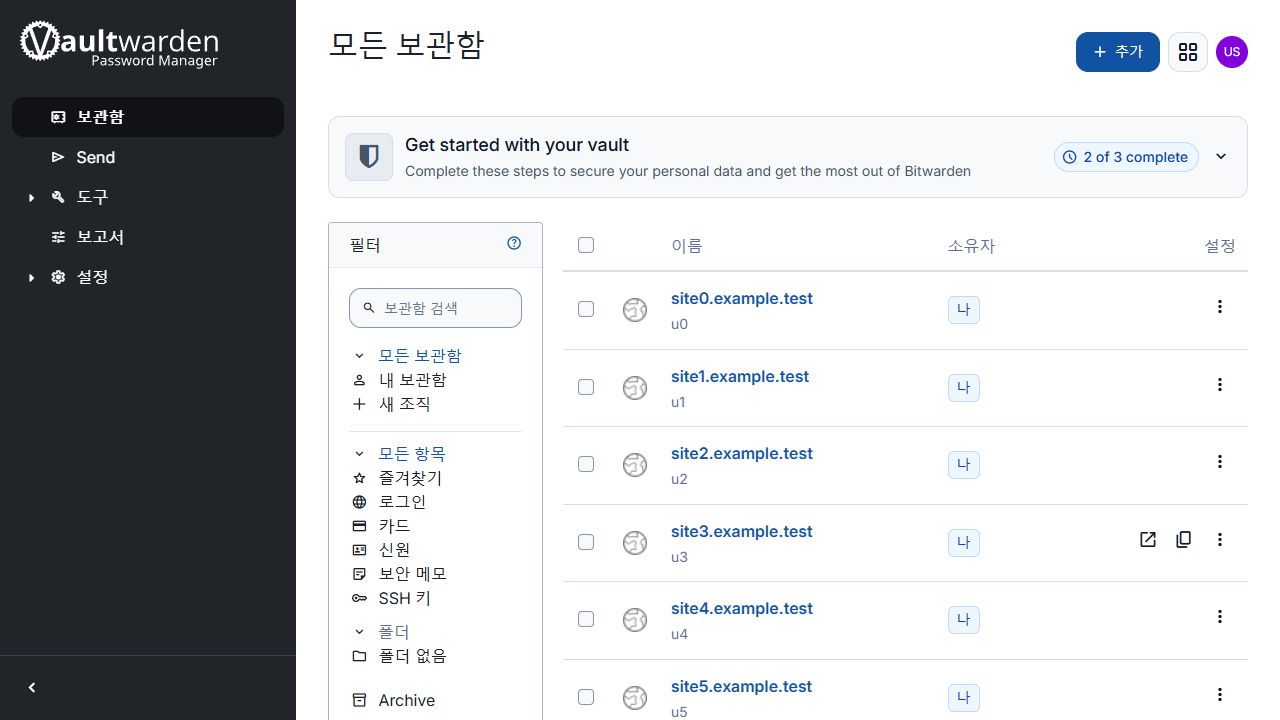
Our test instance: user1's web vault after the import, with the generated example.test logins. The UI is in Korean because of the browser locale on the client machine.
Test setup and the commands we ran
The server was a Vultr vc2-1c-1gb instance (1 vCPU, about 1 GB RAM, 25 GB SSD) in Tokyo, running Ubuntu 24.04.5 LTS. free -m reports 955 MB total on this plan. Docker 29.10.0 went on with the convenience script in 48 seconds, and docker compose up -d pulled and started the official vaultwarden/server:latest image in 17 seconds. The container reported Vaultwarden 1.37.5 and Web-Vault 2026.10.1, with the default SQLite database.
services:
  vaultwarden:
    image: vaultwarden/server:latest
    container_name: vaultwarden
    restart: unless-stopped
    environment:
      DOMAIN: "https://localhost:8443"
      SIGNUPS_ALLOWED: "true"
      LOGIN_RATELIMIT_MAX_BURST: "100"
      LOGIN_RATELIMIT_SECONDS: "1"
    volumes:
      - ./data:/data
    ports:
      - "127.0.0.1:8080:80"
The two rate-limit variable names come from the official .env.template in the Vaultwarden repo. We raised them so five parallel logins wouldn't get throttled, which means a default config might behave differently.
Memory came from a loop on the server that wrote one line about every 2 seconds:
while true; do
  m=$(docker stats --no-stream --format "{{.MemUsage}} | {{.CPUPerc}}" vaultwarden)
  a=$(free -m | awk '/Mem:/{print $7}')
  echo "$(date +%T) $m | avail_MB=$a"
done
The clients didn't run on the server. We registered the 5 accounts through the web vault over an SSH tunnel, then drove the load with the Bitwarden CLI (@bitwarden/cli from npm) in 5 parallel shells on a separate machine:
bw login <email> --passwordenv BW_PASSWORD
bw sync
bw import bitwardencsv items1.csv     # 800 generated logins
for i in $(seq 20); do bw sync; bw list items > /dev/null; done
Because no CLI or browser shared the box, every number in the table is Vaultwarden plus the OS and Docker, nothing else.
One setup detail cost time. With DOMAIN set to an http:// address, the web vault refused to create accounts with "Insecure URL not allowed. All URLs must use HTTPS." That happened even on localhost. We switched DOMAIN to https://localhost:8443 and put a small TLS proxy in front on the client machine. On a real deployment your reverse proxy handles this, but if you test over plain HTTP first, registration may fail the way ours did until DOMAIN is HTTPS.
Why the 58 MB idle figure is the wrong planning number
SSD Nodes' 58 MB (published 2026-10-27) is a real measurement: one idle Vaultwarden container, one user, a small vault with no attachments, SQLite, on a 4 GB Ubuntu 24.04 host, read with docker stats --no-stream. Its article also notes the figure moves with user count, attachments and sync traffic, and it doesn't name a Vaultwarden version.
Our idle reading was much lower, 11.14 MiB, on 1.37.5. We can't say why the two differ; the hosts, versions and vault contents aren't the same, so the numbers shouldn't be averaged. What our run does show is how far idle sits below load. Once real clients logged in and imported, it climbed to 87.72 MiB and then sat near 58.6 to 58.9 MiB, roughly where SSD Nodes' idle figure lands.
Sizing from idle means sizing for a password manager nobody is using. The peak is what has to fit next to everything else on the box. Cloudron staff make a related point on their forum: startup and database migrations can need more memory than steady state. On our first boot with an empty data directory, the 2-second sampler saw at most 7.47 MiB, though a spike shorter than 2 seconds could have slipped between samples.
How much of a 1 GB VPS is left after Vaultwarden
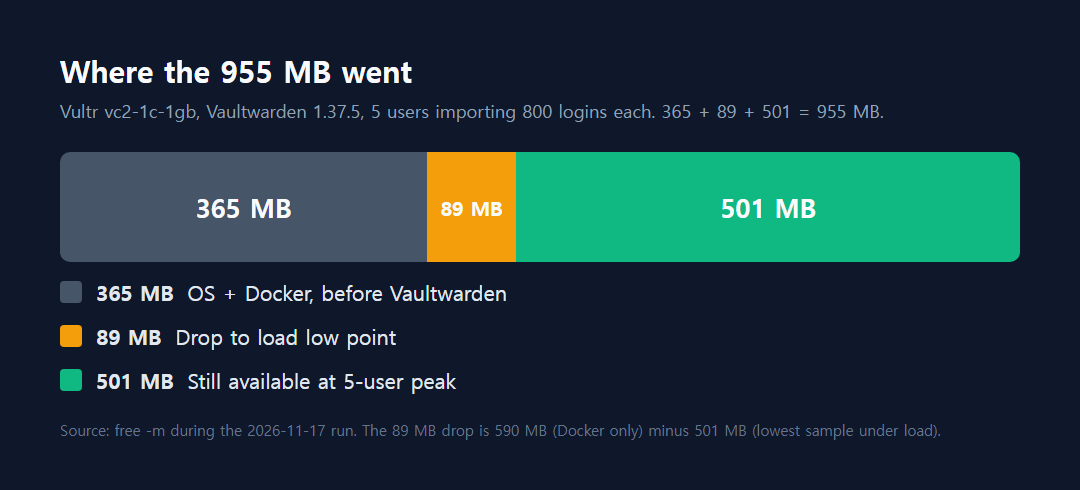
At the 5-user peak, the server still had 501 MB available, which is more than five times Vaultwarden's own peak. The biggest consumer on the box wasn't Vaultwarden at all. Ubuntu alone used 320 MB of the 955 MB, and Docker brought that to 365 MB before Vaultwarden started.
Here's the budget at the lowest point we sampled:
| Slice of the 955 MB | Measured |
|---|---|
| OS + Docker in use before Vaultwarden | 365 MB used |
| Available before Vaultwarden started | 590 MB |
| Available at Vaultwarden idle | 564 MB |
| Available at the 5-user peak | 501 MB |
| Drop from "Docker only" to the load low point | 89 MB |
Our headroom call: a 1 GB plan fits Vaultwarden for 5 users plus one more service whose own peak stays under about 400 MB. The working: 501 MB available at the low point, minus a 100 MB cushion we'd keep for the reverse proxy and for spikes our 2-second sampling could miss, leaves roughly 400 MB. The 100 MB cushion is our assumption, not a measurement. We didn't run Caddy or nginx on this box, so whatever your proxy uses comes out of that cushion. A second service that needs 500 MB or more at its own peak won't fit in RAM, and at that point you'd be relying on swap. If you're sizing the second container, our free Docker RAM calculator helps you add up limits before you deploy.
Our Uptime Kuma measurement on the same plan and our Coolify run on a $5 server show how other self-hosted apps behave on this 1 GB tier.
Disk wasn't a constraint either. The image took 416 MB on disk, and the data directory grew to 75 MB after the load: a 5.9 MB db.sqlite3 plus a 72 MB write-ahead log file.
When a 1 GB VPS is the wrong size for Vaultwarden
Skip the 1 GB plan if anything else you run on the same server peaks above roughly 400 MB, by the arithmetic above. At that point Vaultwarden's own 87.72 MiB peak is the smaller problem.
Also treat these as outside what our numbers cover, and test before you trust a 1 GB plan with them:
- More than 5 active users, or vaults much bigger than 800 items each. We didn't run the 5,000-item vault test.
- Large attachments or Bitwarden Send files. We uploaded none.
- A server with swap turned off. Vultr's Ubuntu image came with a 2.3 GB swap file enabled, and swap use reached 13 MB. We didn't test how the kernel's OOM killer behaves without it. If you plan to keep swap, our swap size calculator suggests a size for small plans.
- Heavy traffic from browser extensions and mobile apps with live notifications. Our clients were CLI sessions only.
Anything bigger than that, measure your own peak with the sampler loop above before committing.
What this test did not cover
This was one run, in one region, with about 4 minutes of load. Each user's import took about 14 to 16 seconds, and the 20 sync rounds were done by 23:29 UTC. It says nothing about memory after hours or days of use.
The sampler read memory about every 2 seconds, so 87.72 MiB is the highest sampled value. A shorter spike could have gone higher, and the same applies to the first-boot reading.
Several things differ from a production setup:
- Login rate limits were raised to burst 100 per 1 second. A default config might throttle five simultaneous logins.
- The TLS proxy and the Bitwarden CLI ran on a separate machine. The server only had Vaultwarden's plain HTTP listener inside an SSH tunnel, so no proxy RAM is included in any number here.
- Swap was on the whole time (2,399 MB file, 13 MB used after load).
- No attachments, no 5,000-item vault, no Caddy run, no browser-extension or mobile-app traffic, and no test with swap disabled.
- The after-load 58.64 MiB looks like a page-cache or allocator effect, but we didn't investigate it or check whether it drops later.
Pick the 1 GB plan if Vaultwarden is the main tenant
For a household or a team of up to 5, Vaultwarden RAM is the smallest line in the budget: 11.14 MiB idle, 87.72 MiB at the measured peak, against 501 MB still available on a 955 MB server. The OS and Docker take more than Vaultwarden does. A $5 Vultr 1 GB instance (the same vc2-1c-1gb plan we tested; third-party price trackers list it at about $5/month in 2026, so check Vultr's pricing page) is enough as long as whatever shares the box peaks below about 400 MB.
If you're planning a stack of several services on one small server, our guide to Docker container memory limits covers how to cap each container so one of them can't push Vaultwarden into swap.