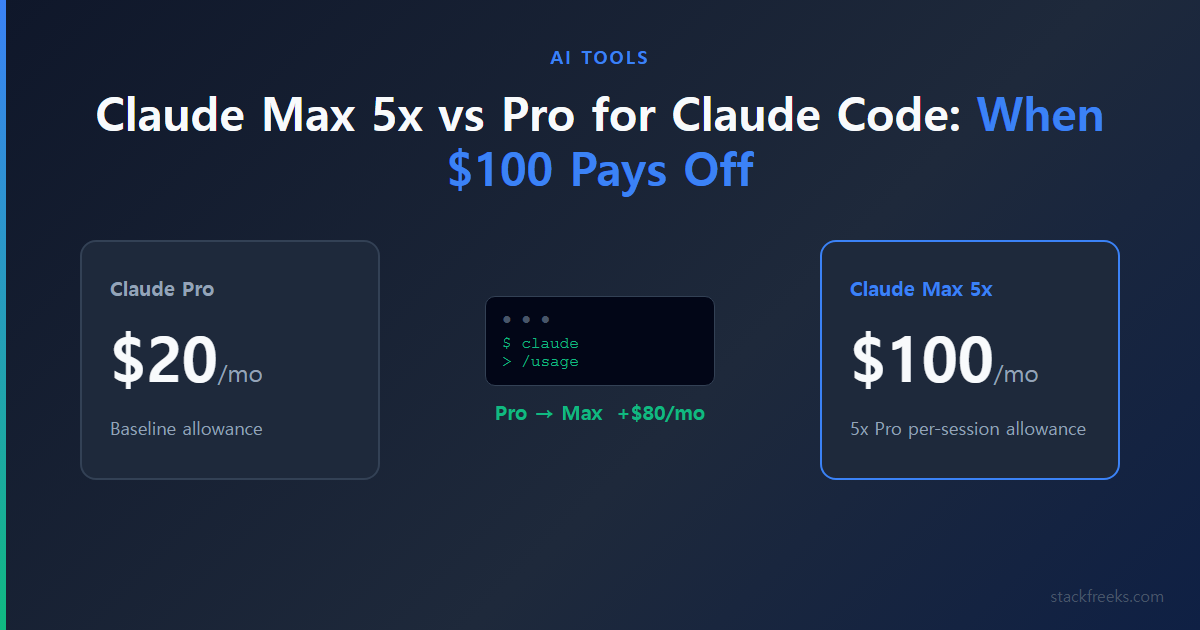
The Claude Max 5x vs Pro decision comes down to one number: $80 a month. As of October 12, 2026, Anthropic charges $20/month for Pro ($17/month if you pay $200 for a year upfront) and $100/month for Max 5x, so the upgrade costs four times what you’re paying now for Claude Code.
Here’s the short answer. Max 5x is worth it if the “you’ve hit your limit” message stops paid work several times a week. If you hit it a few times a month, or only on unusually heavy days, stay on Pro and handle the overflow another way. Everything below is about how to tell which group you’re in, using numbers from your own account instead of guesses from someone else’s.
What Claude Max 5x vs Pro Actually Buys You
Anthropic defines the difference in one sentence. According to the Help Center’s Max plan article, Max 5x gives five times the Pro plan’s per-session allowance. That’s it. There’s no message count, no token count and no “hours of Claude Code” figure attached to any plan.
| Pro | Max 5x | Max 20x | |
|---|---|---|---|
| Price | $20/mo ($17/mo billed annually, $200 upfront) | $100/mo | $200/mo |
| Billing | Monthly or annual | Monthly only | Monthly only |
| Usage per 5-hour session | Baseline | 5x Pro | 20x Pro |
| Weekly limit | Yes | Yes | Yes |
| Claude Code included | Yes | Yes | Yes |
| Models | Opus, Sonnet, Haiku | Opus, Sonnet, Haiku | Opus, Sonnet, Haiku |
| Higher output limits + priority at busy times | No | Yes | Yes |
| Monthly API credits (per pricing page) | None | $100 | $200 |
| Fable models | Usage credits from first request | Up to 50% of weekly limits, then credits | Up to 50% of weekly limits, then credits |
Prices last verified: 2026-10-12 (claude.com/pricing and Claude Help Center).
The mechanics are the same on every plan: a rolling five-hour session limit, plus a weekly limit across all models that resets at a fixed time assigned to your account (you can see it under Settings > Usage). The Help Center also says Anthropic “may limit your usage in other ways,” which is another reason no honest guide can promise you a number.
That gap is why per-plan prompt counts online vary so widely: they’re third-party estimates, and they contradict each other. Our Claude Code rate limits guide lists one such set, labeled as independent testing and verified in August 2026, before the September change below. Anthropic itself (via BleepingComputer) says your allowance depends on conversation length, model choice, tool use and effort level, so it doesn’t map to a fixed number of prompts.
Two things trip people up here. First, Claude Code and claude.ai chat draw from one shared pool, and IDE usage in VS Code, Cursor or JetBrains counts too, per the Help Center’s Claude Code with Pro or Max article. A Pro user who chats heavily all morning can blame Claude Code for a limit their browser tab caused. Second, Claude Code’s default model on Pro and Max alike is Opus 5.5 (per the model-configuration docs), so out of the box a Pro subscriber spends their allowance on the Opus-class default.
The Sep 14 Change Made Older “Pro Is Enough” Advice Stale
If you read a Pro-vs-Max comparison over the summer, its conclusions were written during a temporary boost. BleepingComputer reported on August 29, 2026 that Anthropic had been running a +50% boost on Claude Code weekly limits and would replace it, starting September 14, 2026, with a permanent 25% increase over the original baseline. The change covers Pro, Max, Team and seat-based Enterprise.
Put the original weekly limit at 100. During the boost it was 150. From September 14 it’s 125. That’s 25% more than the original, but about 17% less than what people had gotten used to. After its first announcement drew pushback, Anthropic clarified that “this works out to a 17% reduction” compared to the boosted level.
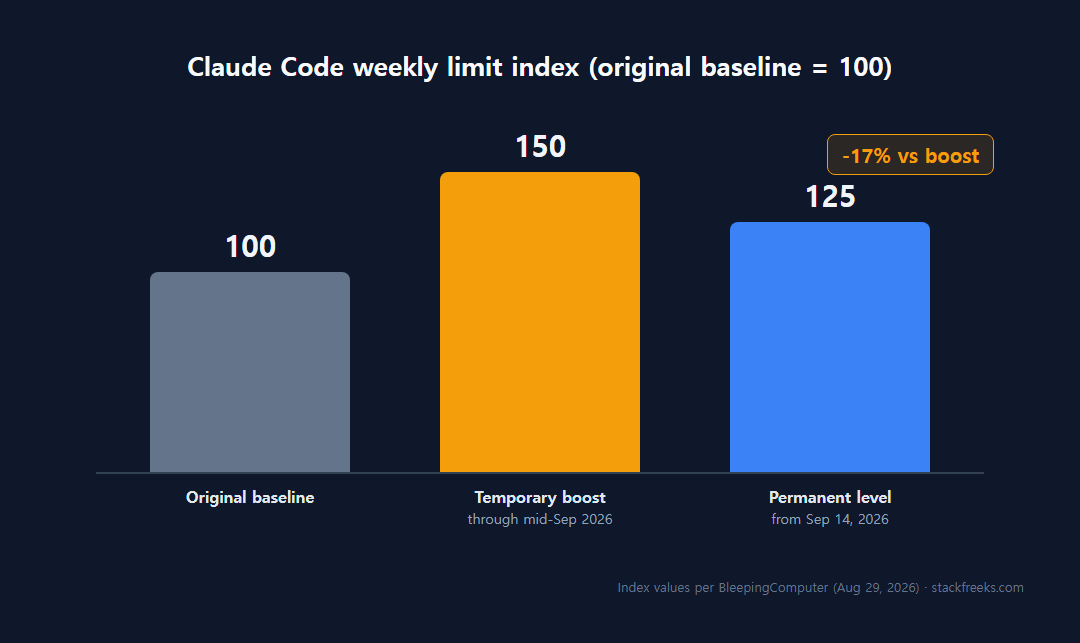
So if you decided Pro was enough in July or August, that decision was made with 20% more weekly headroom than you have today (150 vs 125). Re-measure with /usage now instead of trusting an older guide or your memory of how the summer felt.
Max 5x Buys Capacity, Not a Discount
Using list prices and Anthropic’s multipliers, with Pro’s allowance as one unit:
| Plan | Price | Units of Pro allowance | Price per unit |
|---|---|---|---|
| Pro | $20 | 1 | $20 |
| Max 5x | $100 | 5 | $20 |
| Max 20x | $200 | 20 | $10 |
Arithmetic from list prices checked 2026-10-12; not an Anthropic figure. chudi.dev’s Pro vs Max guide derives the same per-unit costs.
Max 5x costs exactly the same per unit of usage as Pro. You aren’t getting a volume discount; you’re buying more capacity at the same rate. Only Max 20x is cheaper per unit.
That has a practical consequence. If you need roughly 1.3x what Pro gives you, paying for 5x means most of the extra capacity goes unused, and Pro plus occasional overflow is likely cheaper. If you genuinely need four to five times Pro, Max 5x is the efficient choice, because nothing else gets you that much capacity at $20 per unit.
Two Plan Details the Pricing Page Undersells
Max’s monthly API credits don’t work in Claude Code
The pricing page lists $100 of monthly API credits with Max 5x ($200 with Max 20x), which makes the upgrade look partly self-funding. It isn’t, at least not for Claude Code. The Help Center’s Claude Code article is explicit: Max plans include monthly API credits, but they can’t be used in Claude Code or the Claude apps, including for extra usage.
Those credits are for your own API projects, not for keeping a Claude Code session alive past its limit. If you don’t build against the API separately, value them at zero when you run the numbers.
Fable is where Max pulls clearly ahead
The other real difference is Fable. Per the Help Center’s Fable models article (updated 2026-09-02), Fable isn’t included in Pro’s plan limits at all: on Pro, every Fable request bills usage credits from the first token. On Max, Fable can use up to 50% of your weekly limits at no extra cost, then switches to credits.
Fable is never Claude Code’s default; you choose it with /model fable. If you don’t, this difference doesn’t matter to you. If you do want Fable in your daily Claude Code work, Max 5x is the cheapest way to get it inside a subscription instead of paying for every request. For scale, Fable 5.1 bills at $10 per million input tokens and $50 per million output tokens at API rates, versus $4/$20 for Opus 5.5.
One thing Max doesn’t change: the models. Opus, Sonnet and Haiku are listed on all three plans, and no source in this research tested answer quality by plan, so expect the same models, not better answers. Max’s extras are higher output limits and priority access at high-traffic times.
Measure Before You Pay
Anthropic’s own upgrade guidance is “consistently hit limits.” The tools to check that are already in Claude Code. Spend a week or two on this checklist before spending $80:
- Run
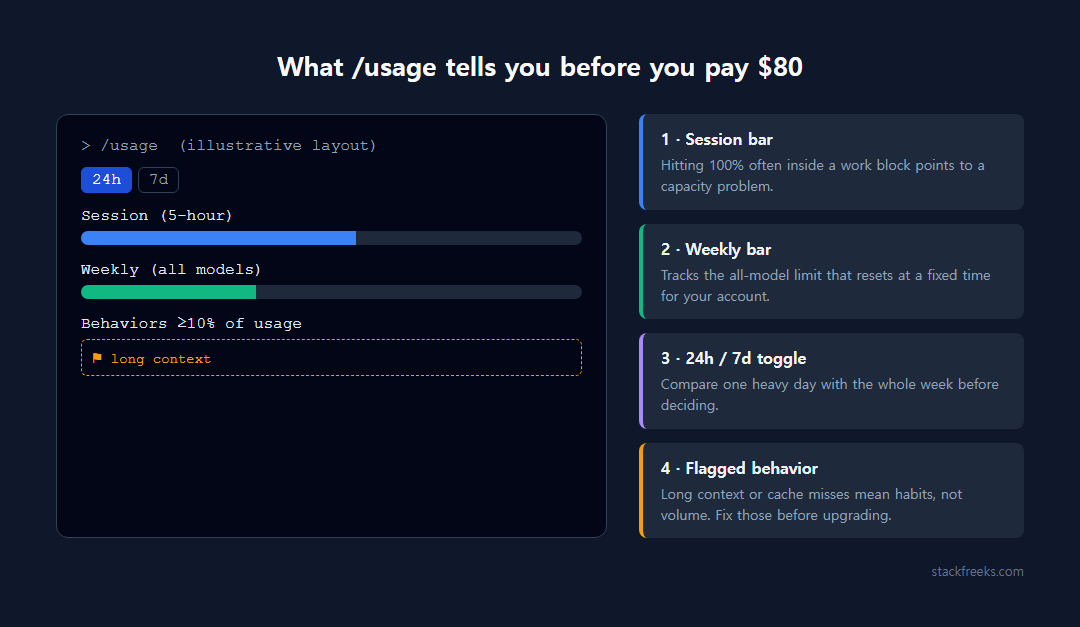
/usagedaily. It shows plan usage bars, attributes usage to skills, subagents, plugins and MCP servers, and flags behaviors that account for 10% or more of usage, such as long context or cache misses. Toggle between 24-hour and 7-day views. One caveat from the Claude Code costs docs: it’s computed from local history on that machine only, so it misses other devices and claude.ai chat. - Check Settings > Usage on claude.ai for the account-wide picture, including your weekly reset time. This is what catches chat eating into your Claude Code allowance.
- Run
/statusto see remaining allocation and to confirm you’re logged in with your claude.ai account. - Log every limit hit for 14 days. Note the date, what you were doing and how long you waited. benchlm.ai’s Pro vs Max guide recommends a 14-day log; it’s an author heuristic, but it beats deciding on one bad afternoon.
- Optional:
/insightsfor longer-term patterns, or add therate_limitsfields to a custom status line so you see how close you are without asking.
At the end, count. A few hits spread over two weeks is a Pro pattern. Several a week, each costing you real work time, is a Max 5x pattern.
Who Should NOT Upgrade to Max 5x
The upgrade fixes one problem: too little capacity. Several situations look like that problem but aren’t.
You rarely hit the limit. If the message shows up a couple of times a month, waiting out the five-hour window or buying credits for that one session costs far less than $80. chudi.dev’s decision ladder (an author heuristic, not Anthropic guidance) puts it the same way: hitting the limit a few times a month means stay on Pro and accept the occasional wait.
/usage flags habits, not volume. If long context or cache misses show up as big flagged items, you’re burning allowance on how you work rather than how much you work. The documented fixes are cheaper than $80: /clear between tasks, Sonnet 5.5 for routine work or opusplan (Opus in plan mode, Sonnet for execution) via /model, a lower /effort (the default is medium), and disabling MCP servers you don’t use with /mcp. Also check for background consumers: scheduled tasks, /loop and idle check-ins use tokens while you’re away, and agent teams use around 7x the tokens of a single session, per the costs docs.
Your usage is bursty or automated. If you need a lot of capacity on three days a month and very little otherwise, paying for 5x all month buys mostly idle headroom. Usage credits at standard API rates fit that pattern better, and fully automated pipelines may be better off on plain API billing anyway. For a sense of scale, chudi.dev estimates a light workload (40 requests a day for 21 days on Sonnet 5.5) at about $7.56/month at API rates. On the other end, Anthropic’s costs docs put the enterprise API-billed average around $13 per developer per active day, or $150–250 a month. That’s enterprise API billing, not a Pro or Max number, but it shows how far apart light and heavy use are.
You might not even be on your subscription. benchlm.ai says that if ANTHROPIC_API_KEY is set in your environment, Claude Code bills that key instead of your plan. That claim isn’t on an Anthropic page, but the Claude Code docs do confirm that /usage-credits is unavailable with API-key auth. Run /status and make sure you’re logged in with your claude.ai account before you conclude Pro is too small.
You’re on annual Pro and mostly fine. Max is monthly-only, so you’d give up the annual discount ($17 vs $20 a month). The Help Center says an annual Pro subscriber moving to Max may get a credit if the unused Pro balance exceeds the Max price; otherwise you’d cancel Pro and wait for it to end.
Upgrade to Max 5x If Limits Stop Paid Work Several Times a Week
Here’s the rule, built from Anthropic’s “consistently hit limits” guidance and the two author heuristics above:
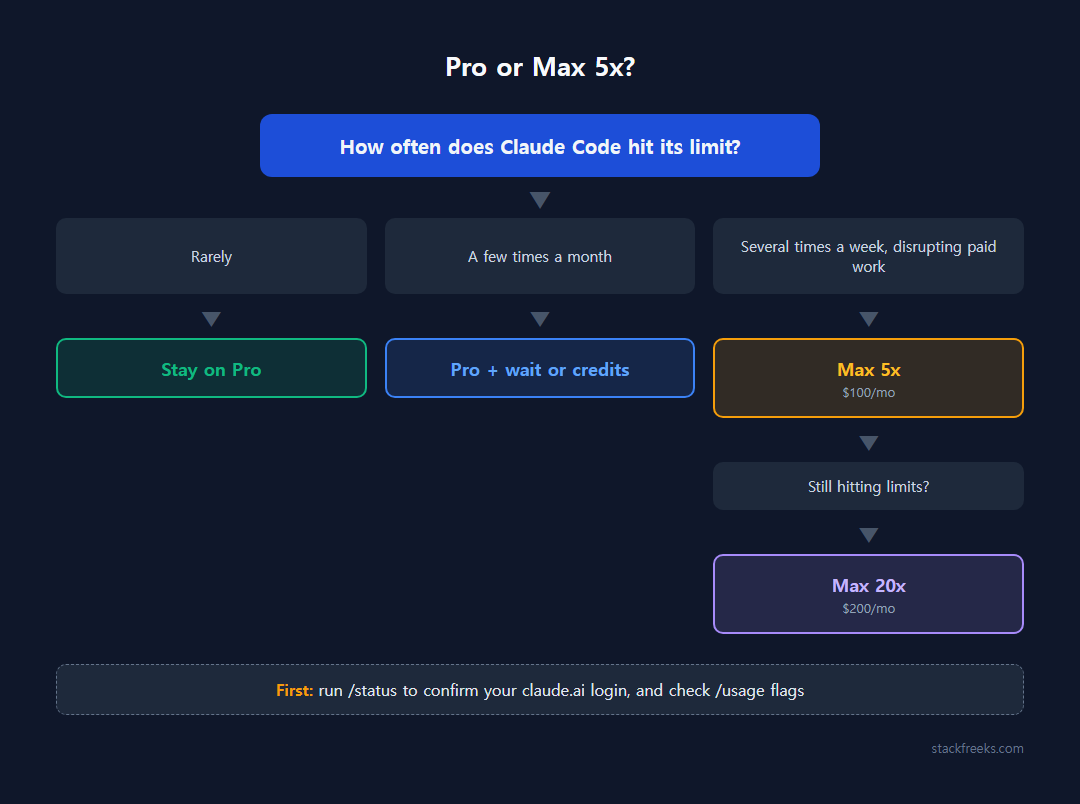
- Rarely hit the 5-hour limit: stay on Pro.
- A few times a month: stay on Pro, wait out the window or use credits for the occasional overflow.
- Several times a week, and it disrupts work you’re paid for: upgrade to Max 5x.
- Still hitting limits on Max 5x: move to Max 20x, the first plan that’s cheaper per unit.
To make the middle case concrete, put your own numbers into one comparison. Add up what you’d spend on usage credits in a month at API rates, plus what the waiting costs you in lost working time. If that total is more than $80, Max 5x pays for itself. If it’s less, it doesn’t. benchlm.ai frames it the same way: pay to remove recurring interruptions, not to collect a bigger multiplier. How credits bill, how to cap them and where people have seen them overshoot is covered in our Claude Code Extra Usage breakdown, so check it before relying on credits as your overflow plan.
The Help Center says upgrades are prorated for the rest of your billing cycle; it doesn’t cover downgrades.
So for Claude Max 5x vs Pro, here’s the call: start with two weeks of /usage and a limit log under the post-September 14 limits. If you’re interrupted several times a week on work that pays, upgrade to Max 5x and stop rationing. If you aren’t, keep the $80 and fix the habits /usage points to. If you’re still weighing Claude Code against other tools entirely, our comparison of AI coding assistants covers the wider field, and why Cursor bills climb shows how usage-based pricing plays out on a competing tool.