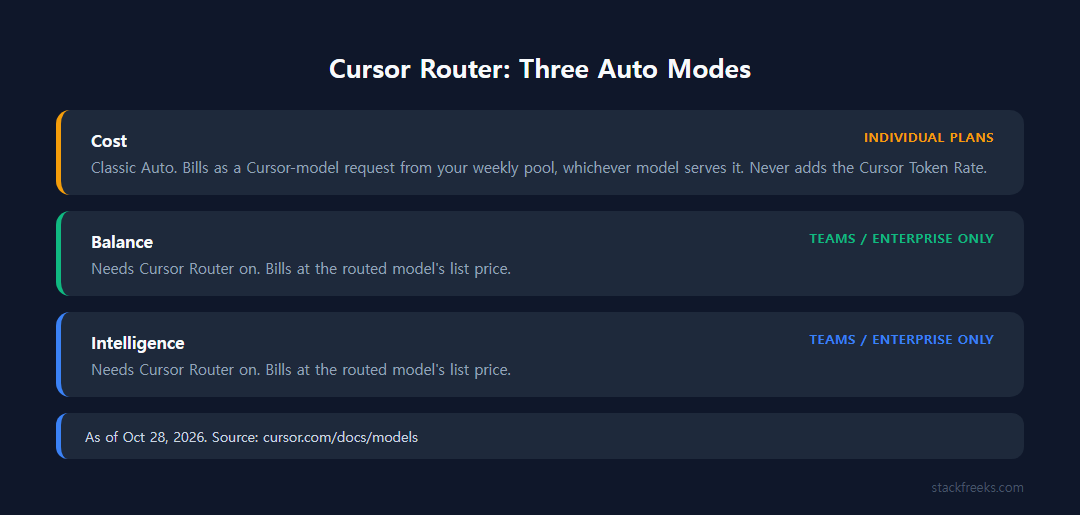
As of October 28, 2026, Auto on individual Cursor plans runs in Cost mode: every request bills as a Cursor-model request from your weekly pool, whichever model serves it, and never adds the $0.25-per-million Cursor Token Rate. The plans are Plus $8, Premium $30, Super $100 and Ultra $200 a month. Balance and Intelligence modes are Teams/Enterprise only and bill the routed model’s list price.
What Cursor Auto mode actually does now
Auto is a routing decision. Instead of you manually picking Claude, GPT, Gemini, or one of Cursor’s own Composer/Grok models for every request, Auto analyzes the query and sends it wherever Cursor’s system judges appropriate: a cheap model for a trivial edit, a stronger reasoning model for architecture work.
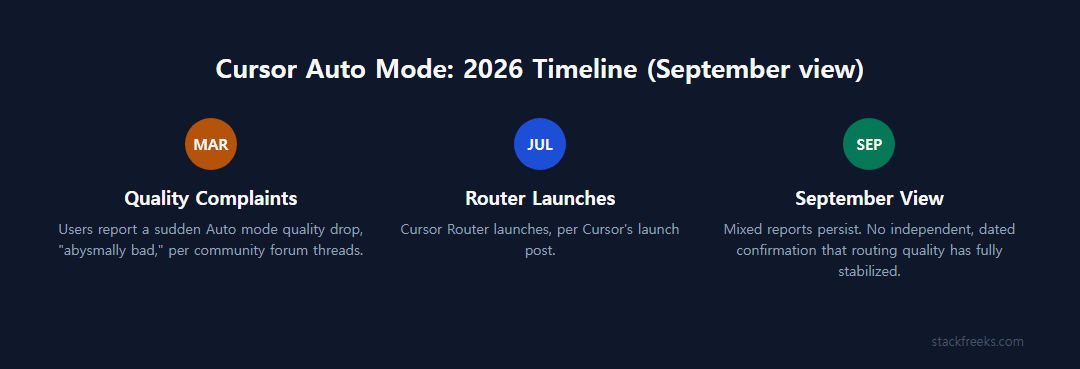
That routing runs on Cursor Router. Cursor’s July 2026 launch post describes it as a classifier trained on more than 600,000 live coding requests, and says Router looks at “the query, surrounding context, and task complexity” and biases toward cost-efficient models for routine work, design-capable models for UI tasks, and frontier models for genuinely hard problems. Auto has three modes: Intelligence (frontier output, higher cost), Balance (daily-driver quality at lower cost), or Cost (token efficiency first). As of October 28, 2026, individual plans get Cost mode only; Balance and Intelligence need a Teams or Enterprise plan with Cursor Router turned on.
Before Router existed, Auto’s selection logic was effectively opaque. Independent testers at Vibe Coding Academy described it as “a black box: consumers do not know which underlying models are being selected or how they are chosen,” and threads on Cursor’s own community forum asking “which models are behind Auto mode?” never got a definitive public answer. Even post-Router, Cursor hasn’t published the full model roster behind each mode. Cursor’s pricing docs list the weekly pool’s models as Grok 4.7, Grok 4.6, Grok 4.5 and Composer 2.5 (checked October 28, 2026), but the exact routing rules stay undisclosed.
Cursor Auto mode pricing: the timeline that actually matters
Cursor has described Auto’s billing three different ways in 2026, so read the descriptions below as a timeline instead of a contradiction to resolve.
Earlier in 2026, Auto mode on paid plans billed at flat per-token rates, and none of that usage touched your monthly credit pool. Only manually selecting a premium model like Opus or a GPT-5-class model pulled from your included credits. That’s the version of Auto that earned its “free unlimited AI” reputation.
After the Router rollout, Cursor’s docs said all Auto modes billed at the list price of the model each request was routed to, and that was still the wording in early October 2026.
As of October 28, 2026, Cursor’s models docs say something narrower. On individual plans Auto is Cost mode only: “Cost mode (classic Auto) bills as a Cursor-model request and draws from your weekly pool whatever model serves it.” Cost mode never incurs the Cursor Token Rate. Balance and Intelligence (Teams and Enterprise with Cursor Router on) bill at the routed model’s list price, and a route to a third-party model is paid from prepaid credit. The $0.25-per-million-token Token Rate applies only on Teams and Enterprise, on eligible third-party models. Legacy plans keep the older setup of two monthly usage pools plus on-demand usage.
If you learned Cursor’s pricing model before July 2026 and haven’t revisited it, the core assumption you’re carrying (“Auto doesn’t touch my credits”) is no longer accurate per Cursor’s own documentation.
The practical shift: savings no longer come from Auto being off-metered. On an individual plan they come from Auto staying inside the weekly pool, while hand-picking Claude, GPT or Gemini on Premium and above bills prepaid credit at API list price from the first request. If you’ve ever opened your usage dashboard and wondered why the numbers looked different than expected, our breakdown of why Cursor bills run high covers the mechanics of that credit-pool math in more detail.
Current Cursor plan prices (2026)
| Plan | Price | Weekly pool | Third-party models (Claude, GPT, Gemini) |
|---|---|---|---|
| Free | $0 | Included | Not included |
| Plus | $8/mo ($80/yr) | Baseline; Grok models only | Not included |
| Premium | $30/mo ($300/yr) | 4x Plus | Prepaid credit at API list price |
| Super | $100/mo ($1,000/yr) | 15x Plus | Prepaid credit at API list price |
| Ultra | $200/mo ($2,000/yr) | 50x Plus | Prepaid credit at API list price |
| Teams | $30, $100 or $200 per seat/mo (Premium, Super or Ultra seat) | Per seat | Balance/Intelligence Auto; $0.25/M Token Rate on eligible models |
Prices from cursor.com/pricing and Cursor’s pricing docs, checked 2026-10-28. The allowance refreshes weekly.
As of October 28, 2026, Cursor’s docs list Hobby, Start, Pro, Pro+, Ultra and the Teams Standard and Premium seats as legacy plans for existing customers, with two monthly usage pools plus on-demand usage. The docs publish no prices for them. Ultra appears on both lists, as a legacy plan and as the current $200 tier.
Auto mode vs. manually picking a model: the real numbers
When you hand-pick a third-party model on Premium or above, you pay that model’s list-price rate from prepaid credit for every token. Per-million-token rates on Cursor’s models docs (checked October 28, 2026) run from GPT-5.6 Luna at $0.20 input / $1.20 output and Composer 2.5 at $0.50 / $2.50 up to Claude Opus 5 at $5 / $25 and GPT-5.5 at $5 / $30, a 25x spread between the cheapest and most expensive input rate. That spread is the entire reason routing can save money: send routine work to the cheap end, reserve the expensive end for problems that actually need it.
Cursor’s July 2026 Router launch post backs this up with first-party numbers for the Teams/Enterprise modes: online A/B tests showed roughly 60% savings using Router versus routing everything to a frontier model, and early enterprise adopters reported 30-50% lower cost compared to sending every request to Opus 4.8. Cursor’s cited cost-per-commit figures are $6.76 (Intelligence mode) and $4.63 (Balance mode), against $12.69 for a comparison model and $7.34 for routing everything to Opus 4.8.
Worth flagging directly: those are Cursor’s own benchmark numbers from a company launch blog post, not figures independently reproduced by a third party. Treat the 60% and 30-50% claims as vendor-reported until someone outside Cursor runs the same comparison. They also describe Intelligence and Balance, which individual plans don’t have.
The closest thing to an independent check comes from a DEV Community writeup that ran five tasks of increasing complexity (a simple UI change through architecture design and test debugging) twice each, once on Auto and once on manually selected Claude Sonnet 4.5, with model choice as the only variable. Auto matched or beat Sonnet’s speed on every task, and the tester found no obvious quality gap: on the debugging task, Auto fixed the issue with a beforeEach setup while Sonnet used .clear(). The approaches differ and both are valid. The writer’s conclusion was that “the ‘Auto is cheating you’ concern doesn’t hold up,” at least for that five-task sample. One real limitation: the piece couldn’t confirm which specific models Auto actually selected behind the scenes, which caps how much it proves about routing quality specifically.
Is Auto mode’s quality actually reliable?
The quality reports are split, and the split is time-dated enough to matter.
Cursor’s own community forum has an active thread, dated around March 11, 2026, where multiple users reported a sudden, sharp quality drop in Auto mode. One user (douglasg14b) called it “abysmally bad” and “effectively useless” within days, describing it as “reminiscent of GPT-3.5, janky,” with Auto failing to retain context from recent prompts, refusing direct instructions, and undoing its own prior work. Other users (TLU, sravasti) reported similar degradation after a recent update, describing it as happening “almost overnight.” One user spotted evidence Auto had routed to what they identified as “gpt 5.4 nano” (a much weaker model than expected), and the thread speculated, without confirmation from Cursor, that this was a deliberate downgrade to nudge users toward premium tiers. Some frustrated users mentioned evaluating Windsurf as an alternative.
Set against that, the DEV Community five-task test described above found no quality gap between Auto and manually selected Sonnet 4.5. Cursor’s own Router announcement frames the tradeoff as achieving “frontier-quality performance at 60% savings.” That implies that, when routing works as designed, users shouldn’t notice a drop at all.
The honest read: the research doesn’t confirm whether the DEV Community test ran before or after the July 2026 Router launch, so these two data points can’t be definitively reconciled into “Auto got fixed” or “Auto is still unreliable.” The most plausible explanation is that the March complaints reflect the pre-Router black-box system and the later test reflects a genuinely different routing engine, but that’s a reasonable inference, not a confirmed fact. If you’re evaluating Auto mode today, weigh both reports and watch your own output quality for the first week rather than assuming either verdict applies to your account.
Separately, broader Cursor complaints not specific to Auto mode are worth knowing about for context: users on Trustpilot and elsewhere report UI lag on files over 500 lines, increased crashes under heavy AI usage, occasional hallucinated functions needing manual verification, and allegations that advertised “unlimited” usage hides strict token limits. These are general platform-trust complaints attributed to user reports, not confirmed facts about Auto specifically.
Cursor vs. Claude Code vs. GitHub Copilot: cost predictability
Auto mode’s savings only matter if you can also predict your total bill, and Composio’s 2026 comparison rates Cursor the least predictable of the three mainstream options, because third-party model usage bills pay-as-you-go. As of October 28, 2026, Cursor’s docs put that usage on prepaid credit, capped by a monthly additional usage limit you set.
Claude Code is included in paid Claude plans: Pro $20, Max 5x $100 and Max 20x $200 a month (claude.com/pricing, October 28, 2026). Usage is limited by a 5-hour session limit plus a weekly limit (see our Claude Max 5x vs Pro comparison), which gives users a clear spending ceiling instead of per-token billing. Entry prices differ: Cursor Plus is $8 but Grok models only, and Claude, GPT or Gemini in Cursor start at Premium, $30. One benchmark cited in Composio’s 2026 comparison found Claude Code uses 5.5x fewer tokens than Cursor for identical tasks, though the same source notes Cursor comes out cheaper for small, surgical edits, while Claude Code’s higher token burn pays off on large-repo reads and long autonomous runs. If rate limits on Claude Code have bitten you before, our guide to why Claude Code hits rate limits explains the usage-window mechanics behind that.
GitHub Copilot moved monthly Pro and Pro+ to usage-based billing on June 1, 2026, replacing premium requests with AI credits (1 credit = $0.01). As of October 28, 2026, Pro at $10/month includes 1,500 credits ($15), Pro+ at $39 includes 7,000 ($70) and Max at $100 includes 20,000 ($200), per GitHub’s billing docs; our Copilot AI credits breakdown has the details. Copilot lands in the middle: both cap paid extra usage (Copilot with a dollar budget, Cursor with a monthly additional usage limit), but Copilot’s included credits reset monthly, while Cursor’s pool refreshes weekly and drains at rates that vary by model.
Composio’s comparison ranks predictability this way: Claude Code (flat capped tiers) ahead of GitHub Copilot (credit-bundle plans with clearer caps) ahead of Cursor (uncapped per-token overage).
As of October 28, 2026, Cursor’s third-party usage is prepaid and capped by a monthly additional usage limit, on top of the weekly pool, so part of Composio’s reasoning for ranking Cursor last no longer applies.
Who Auto mode is actually worth it for
Auto mode makes the most sense if you’re doing high-volume, mixed-complexity work (a lot of small edits, some UI tweaks, occasional harder problems) and you’d rather not manually swap models for every request. On an individual plan the cost case is simpler: Auto is Cost mode and stays in the weekly pool, while hand-picked third-party models bill prepaid credit.
Auto is a worse fit if you need to know what each request costs. Cursor says different models consume the weekly pool at different rates but doesn’t publish the routing rules, so a week of unusually complex requests can drain the pool faster without much warning. It’s also a weaker choice right now if you were burned by the March 2026 quality complaints and haven’t verified for yourself that routing quality has stabilized; there’s no independent, dated confirmation that the issue is fully resolved, only Cursor’s own claims and one favorable independent test of uncertain timing.
If cost predictability matters more to you than potential savings, Claude Code’s flat Max tiers are the safer bet. If you’re on a Cursor Teams plan and want more control over spend, keeping Auto on Cost mode or picking cheaper models such as GPT-5.6 Luna or Composer 2.5 for routine tasks gives you more predictability than leaving Auto on Intelligence. On an individual plan Auto is already Cost mode.
When Cursor Auto mode is a sensible default
Whether Cursor Auto mode is worth it in 2026 comes down to what you’re optimizing for. If you want less manual model-switching and you do mostly routine coding work, Auto is a defensible default. On an individual plan it also keeps you off prepaid credit, because Cost mode bills against the weekly Cursor pool, and the one independent test available found no quality gap against manually selected Claude Sonnet 4.5. Just don’t mistake it for the off-meter “free unlimited” version of Auto from earlier in 2026: Auto now draws from your weekly allowance.
If unpredictable spend is a dealbreaker, or you were burned by the March 2026 quality complaints and haven’t re-tested it yourself, don’t take Auto on faith. Check your own usage dashboard after a week, compare it against what manual model selection would have cost for the same work, and decide from your own numbers rather than either the vendor’s benchmark or a single forum thread.