Cursor’s Please Enable Usage-Based Pricing prompt is the older name for what Cursor now calls on-demand usage: permission to keep running models after your plan’s included usage is gone, billed per token at the model’s API price. It fires for one of two reasons. Either you’ve used up the included pool on your plan, or you picked a model your plan (or the pool you’re in) doesn’t cover.
So the message isn’t an error and it isn’t a bug. It’s Cursor asking whether you want to start paying beyond your subscription. Before you click yes, you need three answers: which version of the message you actually saw, what happens to your card once it’s on, and whether a cheaper model or a hard cap gets you through the month instead.
Which “Please Enable Usage-Based Pricing” Message You Saw
The exact wording tells you which era of Cursor billing you’re dealing with. Cursor switched from 500 “fast requests” a month to usage-based billing tied to model API costs in June 2025, and the prompt has been reworded several times along the way. These are the variants with a documented date:
| Message (as reported) | When | What fired it |
|---|---|---|
| “Due to low rate limits during the preview period, usage-based pricing is required to use o1. Please enable usage-based pricing” | January 2025 (forum report dated 2025-01-27) | Picking o1, which wasn’t included in Pro. A Cursor moderator said o1 was billed separately at $0.40 per request. |
| “GPT-5 is not currently enabled in the slow pool. Please select another model, or enable usage-based pricing to get more fast requests.” | October 2025 to March 2026 | Legacy request-based plan at 500/500 fast requests, plus a premium model the free, queued slow pool wouldn’t serve |
| “Automations require on-demand usage to be enabled” | March 2026 | Setting up Cursor Automations, even on Ultra |
| “You’ve hit your usage limit” | 2026, current plans | Your plan’s included usage for this cycle is spent |
| “You’ve reached your monthly limit. Set a new on-demand limit to continue” | 2026, current plans | Your own on-demand spend cap was hit, not the plan allowance |
Message strings for the two 2026 rows come from third-party troubleshooting guides (continuumcode), not a Cursor-owned page. Older rows are quoted from Cursor Forum threads.
The slow-pool version is the one most people still search for. The first forum report (2025-10-20) came from a user at a “500/500 hard limit” whose Auto selection still routed to GPT-5. Cursor staff called it a temporary capacity issue a few days later, but reports kept coming through March 2026 for GPT-5.1 and claude-4.6-opus, on client versions 1.7.52 through 2.5.20. If you’re seeing that wording today, you’re on a legacy request-based plan or an old client. Check your plan type in the dashboard before anything else, because the fix for a legacy plan isn’t the same as the fix for a current one.
The Automations variant is the odd one. A Cursor staff member (Colin, 2026-03-10) said Automations draw from included credits first but still need on-demand switched on, even at $1, and called the requirement “a bit silly”. Whether that’s changed since isn’t confirmed.
One more message that looks similar but isn’t: “You’ve hit your rate limit on your current plan” is short-term throttling rather than monthly exhaustion, per continuumcode, so it should lift after a short wait. None of the sources say enabling on-demand removes it, so don’t turn on paid usage just to clear this one.
What Enabling Usage-Based Pricing Turns On Today
Flipping the switch enables on-demand usage. Here’s what that changes, per Cursor’s Help pages and staff answers on the forum:
- Same price, no markup (individual plans). Once the included pool is used up, requests keep running at the model’s API list price. Teams and Enterprise also pay the Cursor Token Rate of $0.25 per million tokens on third-party models.
- Individual plans must opt in. On Pro, Pro Plus and Ultra, on-demand stays off until you enable it. Teams have it on by default.
- Billed in arrears, in pieces. Cursor’s pricing page says on-demand is “billed in arrears.” In practice you don’t get one bill at month end. A Cursor staff member (Dean Rie, May 2026) described incremental invoices through the month, each auto-charged to your card via Stripe. First invoices are typically around $20 and rise as you build payment history, with individual invoices capped near $100.
- Separate line items. On-demand charges show up as their own invoices, apart from the subscription.
- Unpaid invoices shut it off. Two or more unpaid invoices auto-disable on-demand.
- No hidden ceiling. A forum user asked whether “unlimited” had a secret cap. Staff answer: no, you can use up to whatever spend limit you’ve set in the dashboard. If you set none, there’s nothing stopping the meter.
That last point is why the order of operations matters. Cursor doesn’t document any default on-demand limit, so the first thing to do after enabling it is set one.
Also note what doesn’t happen: Cursor doesn’t silently downgrade you to a weaker model when you hit a limit (per learncursor). You either enable on-demand, switch models yourself, or upgrade.
How to Enable On-Demand Usage and Set a Spend Limit in Cursor
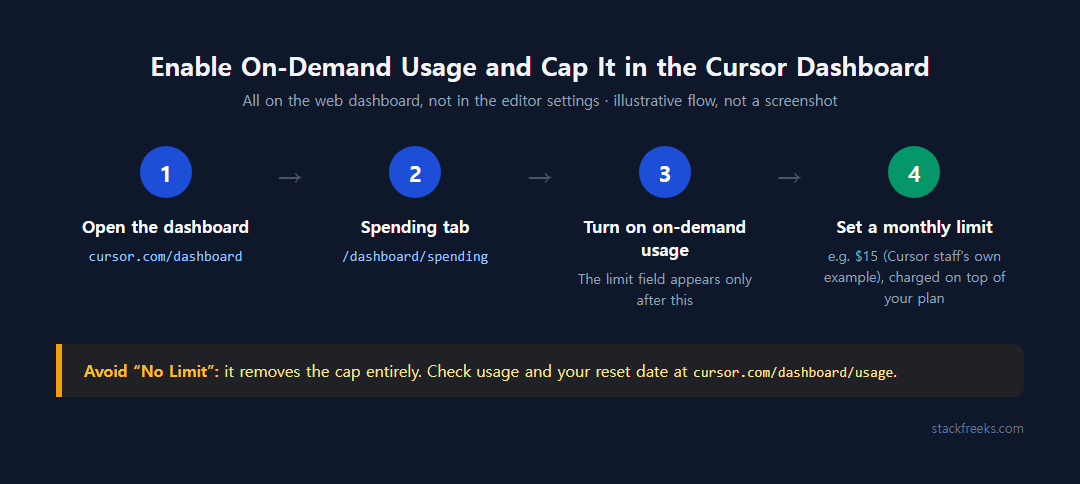
Everything lives on the web dashboard, not in the editor settings.
- Go to cursor.com/dashboard and open the Spending tab (direct link: cursor.com/dashboard/spending).
- Turn on on-demand usage. The limit field only appears after this, because Cursor won’t let you set a limit on something that’s switched off.
- Set a monthly spend limit. Pick a number now. “No Limit” is one of the options and it removes the cap entirely.
- Check your usage and the reset date at cursor.com/dashboard/usage.
A few behaviors worth knowing before you pick the number:
Changes apply immediately. Raise or lower the limit and it takes effect right away. When you hit it, on-demand stops until you raise the limit or the next billing cycle starts. That’s the moment you’ll see the “You’ve reached your monthly limit” message.
Enforcement lags a little. Cursor’s Help page says limits aren’t enforced instantly, and Cursor applies a temporary spend-limit credit to cover small overshoots, so a brief overshoot past your cap isn’t billed to you. The catch, per the same page: that credit isn’t a refund, and if you raise your limit later in the same cycle, Cursor may bill some or all of it, up to the new limit. Leave the limit unchanged (or turn on-demand off) to keep the credit.
The cap is on top of the subscription. Cursor staff (Kevin Neilson) gave the example of a $15 on-demand limit: you won’t be charged more than $15 above your plan price.
Alerts don’t stop anything. Spend alerts, added via Add Alert on the same Spending page by team admins, are email-only and count only on-demand spend. They’re a heads-up, not a brake. Use a limit for that.
Teams work differently. A team-level limit cuts off on-demand for every member once it’s reached. Admins can lock settings with the “Only Admins Can Edit Usage Settings” toggle under Permissions, and Dynamic Spend Limits scale the cap with seat count. Enterprise adds per-member and per-group overrides.
What Each Model Costs Once Your Included Pool Is Gone
If you already know why your bill grows (and if not, our breakdown of why Cursor bills climb under usage pricing covers that), the useful number now is the per-model price you’ll pay on-demand. These are list prices from Cursor’s own Models page:
| Model | Pool | Input / 1M tokens | Cache read / 1M | Output / 1M |
|---|---|---|---|---|
| Composer 2.5 | Cursor Models | $0.50 | $0.20 | $2.50 |
| Grok 4.6 / 4.7 | Cursor Models | $2 | $0.50 | $6 |
| GPT-5.4 Mini | Other Models | $0.75 | $0.075 | $4.50 |
| Gemini 3.8 Flash | Other Models | $0.75 | $0.075 | $3.50 |
| GPT-5 | Other Models | $1.25 | $0.125 | $10 |
| Claude Sonnet 5 | Other Models | $2 | $0.20 | $10 |
| GPT-5.4 | Other Models | $2.50 | $0.25 | $15 |
| Claude Opus 5 | Other Models | $5 | $0.50 | $25 |
| Claude Fable 5 | Other Models | $10 | $1 | $50 |
Prices checked October 3, 2026 on cursor.com/docs/models. Max Mode isn’t in this table because Cursor now offers it only on legacy request-based plans.
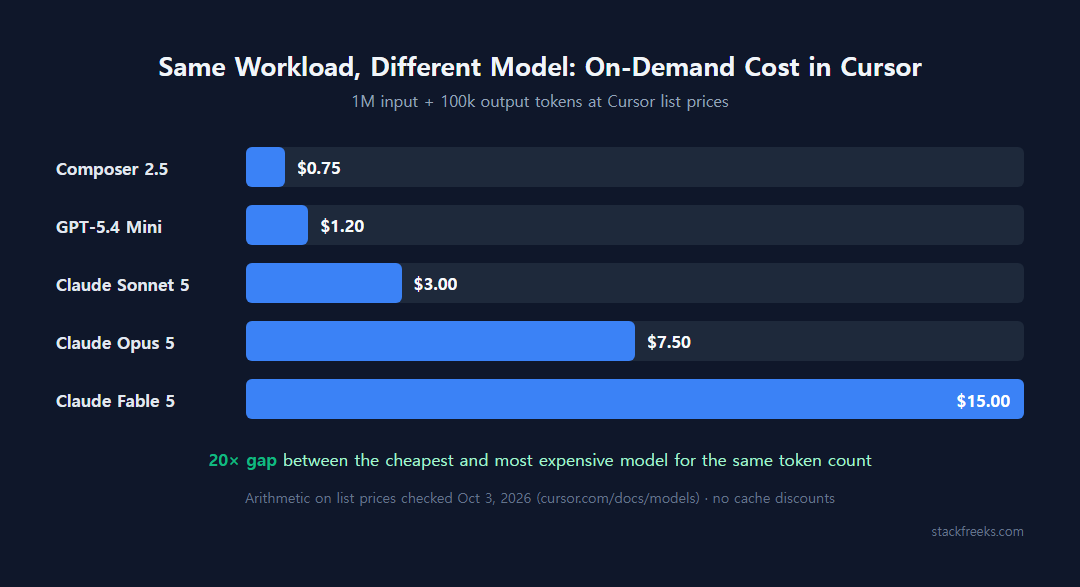
To put the spread in dollars, here’s plain arithmetic on those list prices, ignoring cache discounts. A chunk of work using 1M input tokens and 100k output tokens costs:
- $0.75 on Composer 2.5
- $1.20 on GPT-5.4 Mini
- $3.00 on Claude Sonnet 5
- $7.50 on Claude Opus 5
- $15.00 on Claude Fable 5
That’s a 20× gap for the same token count. It’s the single biggest lever you control once on-demand is on.
Two pools, and why switching models sometimes clears the message
Since August 2026, paid plans carry two separate allowances. The Cursor Models pool covers Composer 2.5 and Grok 4.5/4.6/4.7, and Cursor says it includes “significantly more” usage. The Other Models pool covers Claude, GPT, Gemini and the rest, charged at each model’s API price. Cursor doesn’t publish the dollar size of either pool.
Third-party guides fill that gap with numbers you should treat as unofficial. learncursor and flexprice put the Other Models pool at $20 on Pro, $70 on Pro Plus and $400 on Ultra. cellcog reports Ultra dashboards showing $500 for Other Models and $3,000 for Cursor Models, which conflicts with the $400 figure. Using the third-party $20 Pro figure, the arithmetic above would cover that sample workload about 6.7 times on Sonnet 5 but only about 1.3 times on Fable 5.
The practical point: the pools empty separately. If Other Models runs dry, Composer 2.5 or Grok may still be served from the Cursor Models pool, and the usage-limit message goes away without spending anything.
Auto is no longer a free escape hatch
A lot of older pricing explainers (Verdent in May 2026, aitoolgrade “last verified June 2026”) still say Auto is unlimited or flat-rate. That stopped being true on August 24, 2026. Cursor retired the flat Auto rate ($1.25 input / $0.25 cache read / $6 output per 1M), and per Cursor’s docs, all Auto modes now bill at the list price of whatever model each request is routed to. The flat rate survived only as “Legacy Enterprise Auto,” which sunset on September 7, 2026.
Auto runs on the Cursor Router, launched July 22, 2026 with three modes: Intelligence, Balance and Cost. Users were defaulted to Cost mode. When Cost routes you to Composer 2.5, you pay less than the old flat rate. When a request lands on Claude Opus 5, the same sample workload costs roughly 4× what the flat rate charged. Our Cursor Auto mode cost guide goes through when each mode is worth it.
Should You Enable It? Five Options by Situation
Enabling on-demand is one option among five, and for many people it isn’t the first one to try.
| Your situation | Best move | Not for you if… |
|---|---|---|
| One pool is empty, the other isn’t | Switch to a model in the other pool (Composer 2.5, Grok) | You need a specific Claude or GPT model for the task |
| You don’t care which model answers | Auto in Cost mode | You need predictable per-request cost |
| Reset is a few days away | Wait for the monthly reset | You’re on a deadline |
| You need to keep working now, any model | Enable on-demand with a small hard cap | You won’t actually set the cap |
| You hit the limit every month | Upgrade (Pro Plus $60 or Ultra $200) | Your overage is a one-off spike |
Switch models first. This costs nothing if the other pool still has balance. Composer 2.5 is the cheapest model on Cursor’s list at $0.50 input / $2.50 output per 1M, and GPT-5.4 Mini and Gemini 3.8 Flash are the cheap options inside the Other Models pool. The trade-off is quality on hard multi-file refactors, where you may end up re-prompting.
Auto Cost is a reasonable default, not a guarantee. It bills the routed model’s price, so it usually stays cheap, but you can’t see in advance which model a request will hit. If your spending has to be predictable, pick the model yourself.
Waiting is underrated. Allowances reset monthly on your billing-cycle date, including for annual subscribers, and the date is on cursor.com/dashboard/usage. Unused usage doesn’t roll over, and signing out or reinstalling won’t restore quota, per continuumcode. Waiting isn’t free usage, though: once both pools are empty and on-demand is off, model requests are blocked until the reset. If you’re only a few days out and not on a deadline, that pause costs nothing extra.
A small hard cap is the safe way to say yes. Cursor staff’s $15 example is a sensible starting point for a solo developer who just needs to finish the week. You keep working, the worst case is known, and on-demand stops on its own if you overshoot. Who shouldn’t do this: anyone tempted to pick “No Limit” just to make the prompt go away.
Upgrade only if the overage repeats. Cursor’s own usage profiles say daily Tab users usually stay within included usage, daily agent users typically land at “$60–$100/mo total usage”, and power users at “$200+/mo”. If you’re consistently in that agent band, Pro Plus at $60 makes more sense than a $20 plan plus an on-demand bill every month. If you blew past the limit once during a big refactor, don’t upgrade over a one-off. (The pricing page currently labels the $20 tier “Individual”; the docs still call it Pro.)
Legacy wording? Check your plan. If your message says “slow pool” or mentions o1, it comes from the old request-based system. Confirm your plan type in the dashboard; on a current plan you shouldn’t see that wording at all.
For context on how this compares with a competitor’s metering, see how GitHub Copilot’s AI credits billing works.
Set a Cap Before You Click Enable
If Cursor shows you Please Enable Usage-Based Pricing (or today’s “You’ve hit your usage limit”) and you need to keep coding, try a model from the other pool first. Composer 2.5 costs nothing extra if the Cursor Models pool still has room. If that doesn’t work for the task, open cursor.com/dashboard, go to the Spending tab, enable on-demand and type in a monthly limit you’d be fine losing (Cursor staff’s own example is $15) before you send another request. Leave “No Limit” alone unless someone else is watching the invoices.